
NovaStar VX2U ตัวควบคุมวิดีโอ LED แบบครบวงจร พร้อมฟังก์ชั่นเล่นผ่าน USB
ราคาเดิม: ราคาปัจจุบัน: 816.00 ดอลลาร์สหรัฐ
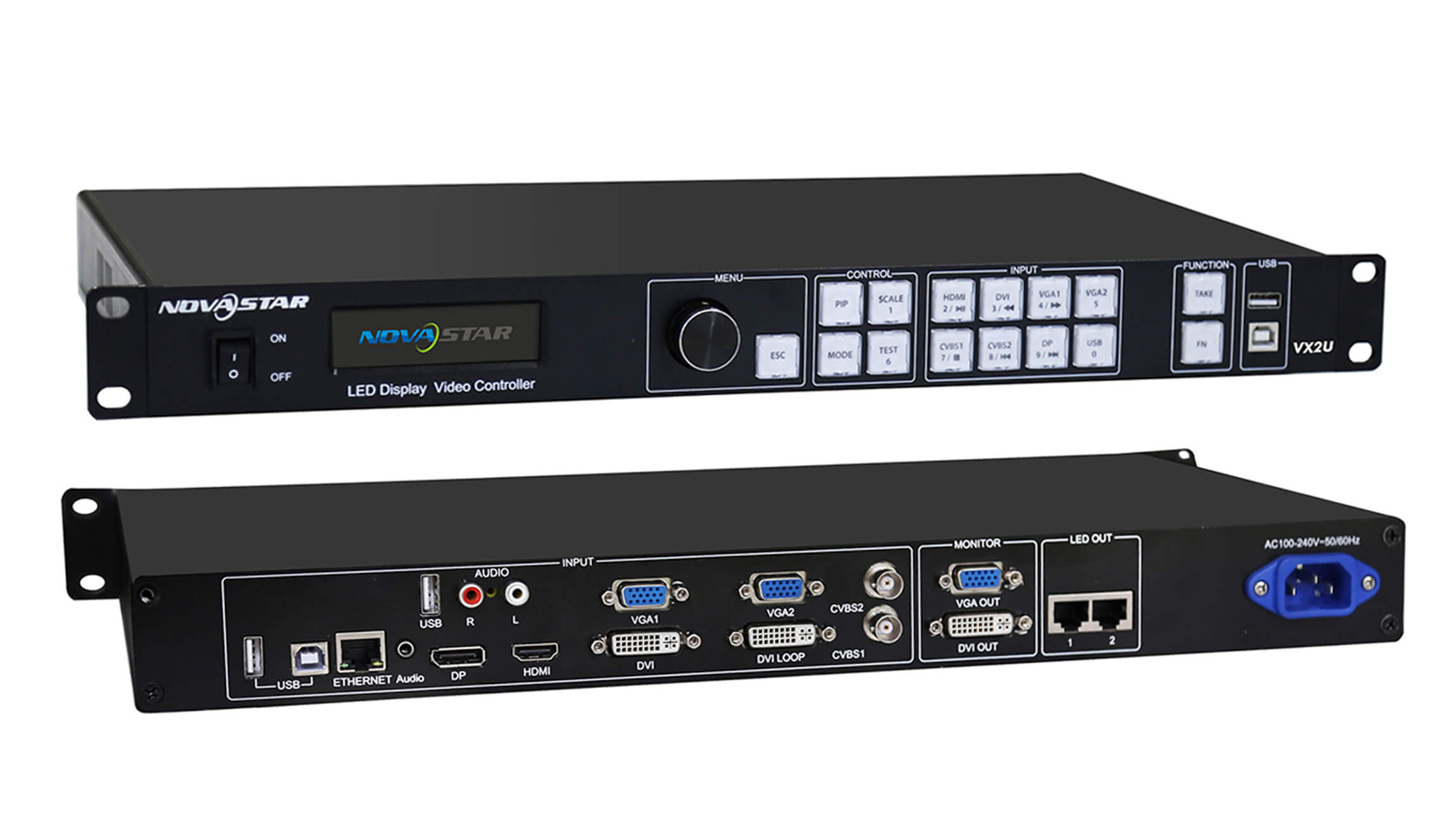
Switch between a live video feed and media on a USB drive from the front panel. The NovaStar VX2U combines scaling, picture-in-picture and LED output in one unit and drives up to 1.3 million pixels across two Gigabit Ethernet ports.
10000 ในสต็อก
Switching between live sources and USB playback
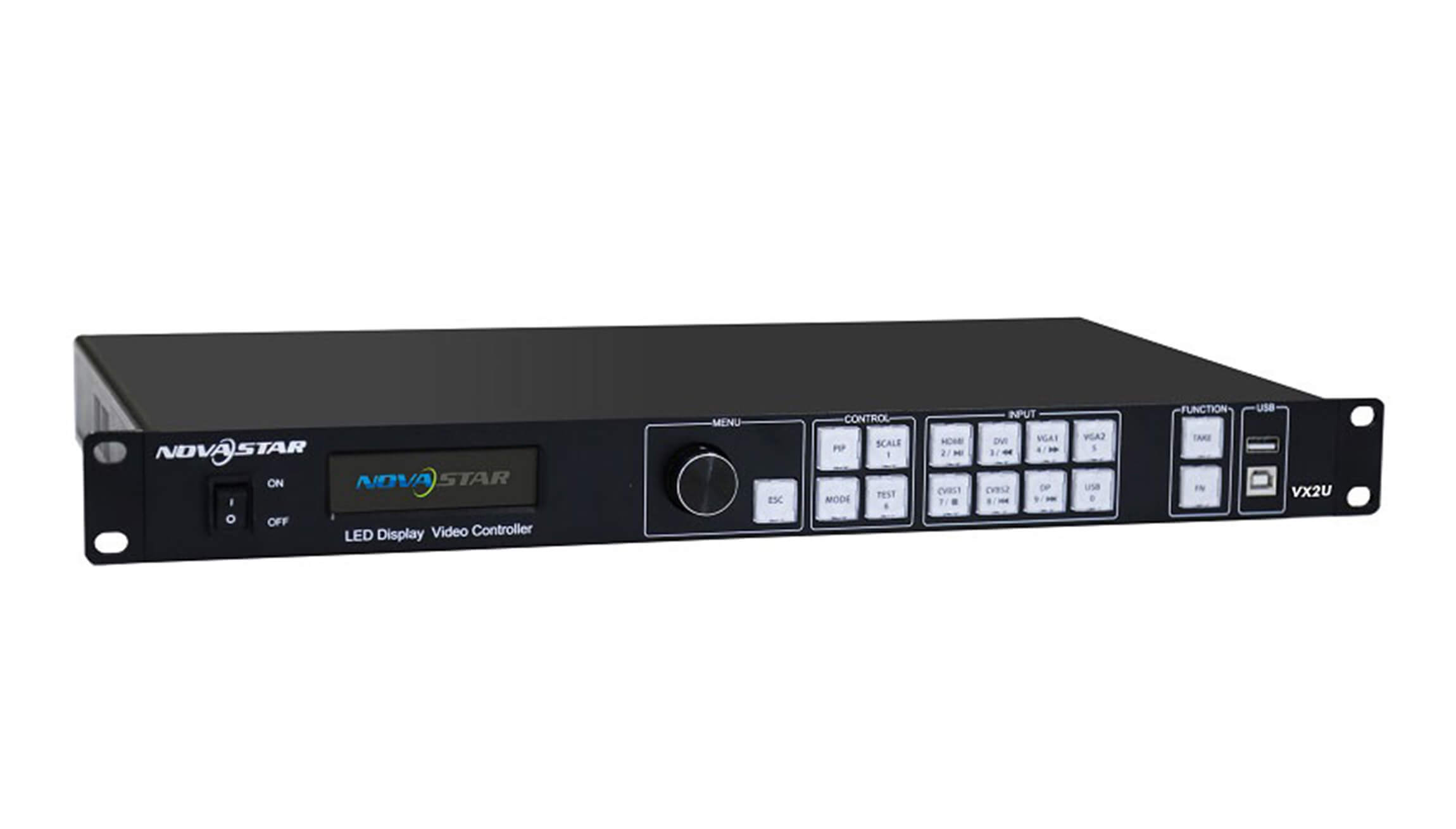
For a presentation with a laptop feed and a standby slide, connect the laptop to HDMI and load the slide on a USB drive. The VX2U has a front-panel key for each source. Press a key to select the main picture, or hold it to select a source for the picture-in-picture window. Use the rotary knob to set the window size and position.
Screen capacity and connections
To size the controller for a wall, multiply the wall’s pixel width by its pixel height. A 1920 × 640 wall uses 1,228,800 pixels and fits the VX2U’s total capacity. A 1920 × 1080 wall uses 2,073,600 pixels and exceeds it. The controller can scale a larger input image to fit a smaller LED canvas.
| Specification | VX2U rating |
|---|---|
| เอาต์พุต LED | 2 Gigabit Ethernet ports, 1.3 million pixels combined |
| Maximum screen width or height | 3,840 pixels wide or 1,920 pixels high, within the total pixel limit |
| อินพุตวิดีโอดิจิตอล | 1 HDMI, 1 DVI and 1 DisplayPort |
| อินพุตวิดีโอแบบอนาล็อก | 2 VGA and 2 composite (CVBS, PAL/NTSC) |
| VGA input timing | ความละเอียดสูงสุด 1920 × 1200 ที่ 60 เฮิรตซ์ |
| แหล่งจ่ายไฟและการบริโภค | 100–240 โวลต์ AC, 50/60 เฮิรตซ์, 25 วัตต์ |
| อุณหภูมิในการทำงาน | -20 ถึง 60 °C |
| ขนาดแชสซี | กว้าง 482.6 มม. × ลึก 250 มม. × สูง 45 มม. |
| น้ำหนักของตัวควบคุม | 2.55 |
Rear-panel connections
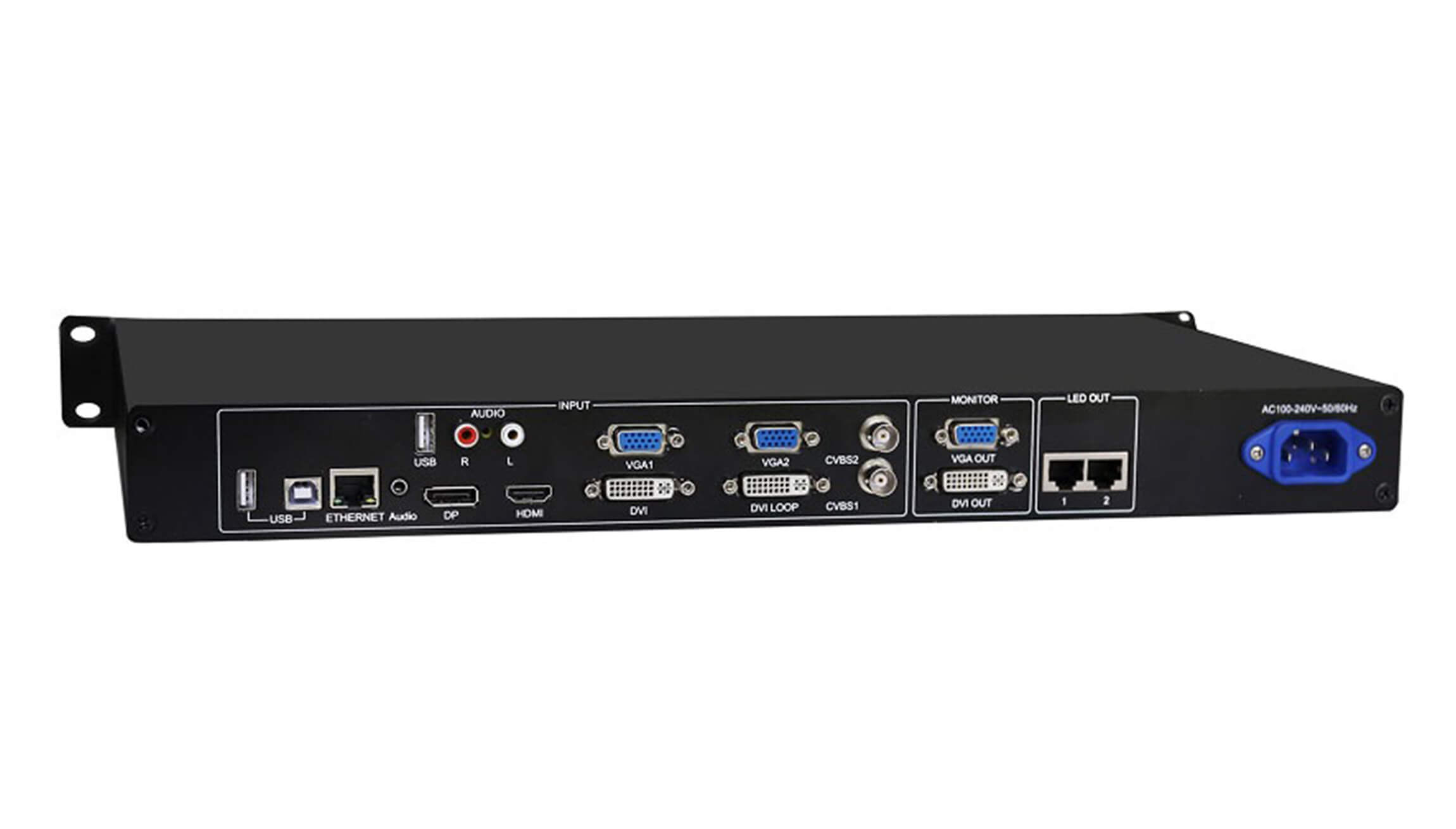
Connect the LED cabinet data cables to the two ports marked LED OUT. The separate ETHERNET port is for controller communication. If you use a multifunction card to decode audio, connect it to LED OUT 1.
For a monitor connection, check the labels on your unit before choosing a cable. The photographed panel shows VGA OUT and DVI OUT. Revision 1.0.3 of the specification lists two DVI monitor outputs.
Download the NovaStar VX2U specifications (PDF, Rev. 1.0.3) for the dimension drawing, port assignments and picture-in-picture source combinations.
คำถามที่พบบ่อย
Do I need a computer for screen setup?
You can configure the screen using the LCD and rotary knob on the controller. A computer can also connect through the USB Type-B control port.
Which files can I play from a USB drive?
For still images, use JPEG, BMP or PNG. For video, check both the file extension and the codec. For example, the specification lists MP4 as a container and H.264 as a supported codec.
Can I use HDMI and DVI together for picture-in-picture?
HDMI and DVI cannot form a main-picture and inset pair. HDMI and DisplayPort can. The source matrix on the last page of the PDF lists the other combinations.
What does DVI LOOP carry?
DVI LOOP passes the incoming DVI signal to another device. For the LED wall, use the numbered LED OUT ports.
| น้ำหนัก | 9.09 |
|---|
Be the first to review “NovaStar VX2U All-in-One LED Video Controller with USB Playback”
คุณต้องเข้าสู่ระบบก่อนจึงจะสามารถโพสต์รีวิวได้
ฉันจะถูกเรียกเก็บภาษีศุลกากรและภาษีหรือไม่
ราคาที่แสดงบนเว็บไซต์ของเราเป็นราคาปลอดภาษี (เป็นดอลลาร์สหรัฐ) ซึ่งหมายความว่าคุณอาจต้องชำระภาษีนำเข้าและภาษีอื่นๆ เมื่อได้รับคำสั่งซื้อของคุณแล้ว ภาษีนำเข้า ภาษีอากร และค่าธรรมเนียมศุลกากรที่เกี่ยวข้องจะถูกกำหนดโดยสำนักงานศุลกากรในพื้นที่ของคุณเมื่อคำสั่งซื้อของคุณมาถึงปลายทางสุดท้าย
โปรดทราบว่าค่าใช้จ่ายและภาษีเพิ่มเติมเหล่านี้เป็นความรับผิดชอบของคุณ และเราไม่มีส่วนรับผิดชอบใดๆ ทั้งสิ้น เราไม่รับผิดชอบในการชำระหรือชดเชยค่าภาษีศุลกากร ภาษี หรือค่าธรรมเนียมที่เกี่ยวข้องใดๆหากต้องการรายละเอียดเพิ่มเติมเกี่ยวกับค่าใช้จ่ายเหล่านี้ โปรดติดต่อสำนักงานศุลกากรในพื้นที่ของคุณ
การส่งสินค้า
เราสามารถจัดส่งไปยังที่อยู่ใด ๆ ในโลก โปรดทราบว่ามีข้อ จำกัด ในบางผลิตภัณฑ์และบางผลิตภัณฑ์ไม่สามารถส่งไปยังจุดหมายปลายทางต่างประเทศได้ ..
เมื่อคุณสั่งซื้อเราจะประมาณการวันจัดส่งและวันที่จัดส่งให้กับคุณโดยขึ้นอยู่กับความพร้อมใช้งานของสินค้าและตัวเลือกการจัดส่งที่คุณเลือก ค่าจัดส่งวันที่จัดส่งอาจขึ้นอยู่กับผู้จัดส่งที่คุณเลือกไว้ในหน้าราคาการจัดส่ง
โปรดทราบว่าอัตราการจัดส่งสำหรับสินค้าหลายรายการที่เราขายเป็นน้ำหนัก น้ำหนักของรายการดังกล่าวสามารถพบได้ในหน้ารายละเอียด เพื่อสะท้อนนโยบายของ บริษัท ขนส่งที่เราใช้น้ำหนักทั้งหมดจะถูกปัดเศษเป็นปอนด์เต็ม
นโยบายการคืนสินค้า
คุณสามารถส่งคืนสินค้าที่ยังไม่ได้เปิดส่วนใหญ่ภายใน 30 วันหลังจากได้รับเงินคืนเต็มจำนวน นอกจากนี้เราจะจ่ายค่าจัดส่งกลับหากผลตอบแทนเป็นข้อผิดพลาดของเรา (คุณได้รับรายการที่ไม่ถูกต้องหรือมีข้อบกพร่อง ฯลฯ )
คุณควรคาดหวังว่าจะได้รับเงินคืนภายในสี่สัปดาห์หลังจากส่งมอบแพคเกจให้กับผู้จัดส่งคืน แต่ในหลายกรณีคุณจะได้รับเงินคืนเร็วขึ้น ระยะเวลานี้รวมเวลาในการขนส่งเพื่อให้เราได้รับผลตอบแทนจากผู้ขนส่ง (5 ถึง 10 วันทำการ) เวลาที่เราต้องดำเนินการคืนสินค้าของคุณเมื่อเราได้รับสินค้า (3 ถึง 5 วันทำการ) และเวลาที่ใช้ ธนาคารของคุณเพื่อดำเนินการขอคืนเงินของเรา (5 ถึง 10 วันทำการ)
หากคุณต้องการส่งคืนสินค้าเพียงลงชื่อเข้าใช้บัญชีของคุณดูคำสั่งซื้อโดยใช้ลิงก์ "สั่งซื้อเสร็จสมบูรณ์" ภายใต้เมนูบัญชีของฉันและคลิกปุ่มส่งคืนสินค้า เราจะแจ้งให้คุณทราบทางอีเมลของการคืนเงินของคุณเมื่อเราได้รับและประมวลผลรายการที่ส่งคืน ..
รายการสินค้า ที่เกี่ยวข้อง


รีวิว
ไม่มีความคิดเห็น