Eager-LED Academy
Novastar MX30 Buying Guide: Is It Right for Your LED Wall?
Aug
The Novastar MX30 Buying Guide starts with a practical answer: the MX30 is a strong fit for a professional LED wall that stays within 6.5 million output pixels, uses standard 1G receiving-card architecture, and needs 4K input, Genlock, 3G-SDI, fiber transport, or low-latency operation in one 2U controller. It is not the automatic choice for every screen.
Buyers most often misjudge the MX30 in two ways. They compare only the headline pixel capacity, or they assume that every COEX feature works with every receiving card and operating mode. This guide turns the official specifications into a system-level decision covering screen mapping, inputs, redundancy, fiber, receiving cards, software, and commissioning.
1. Is the NovaStar MX30 Right for Your LED Wall?
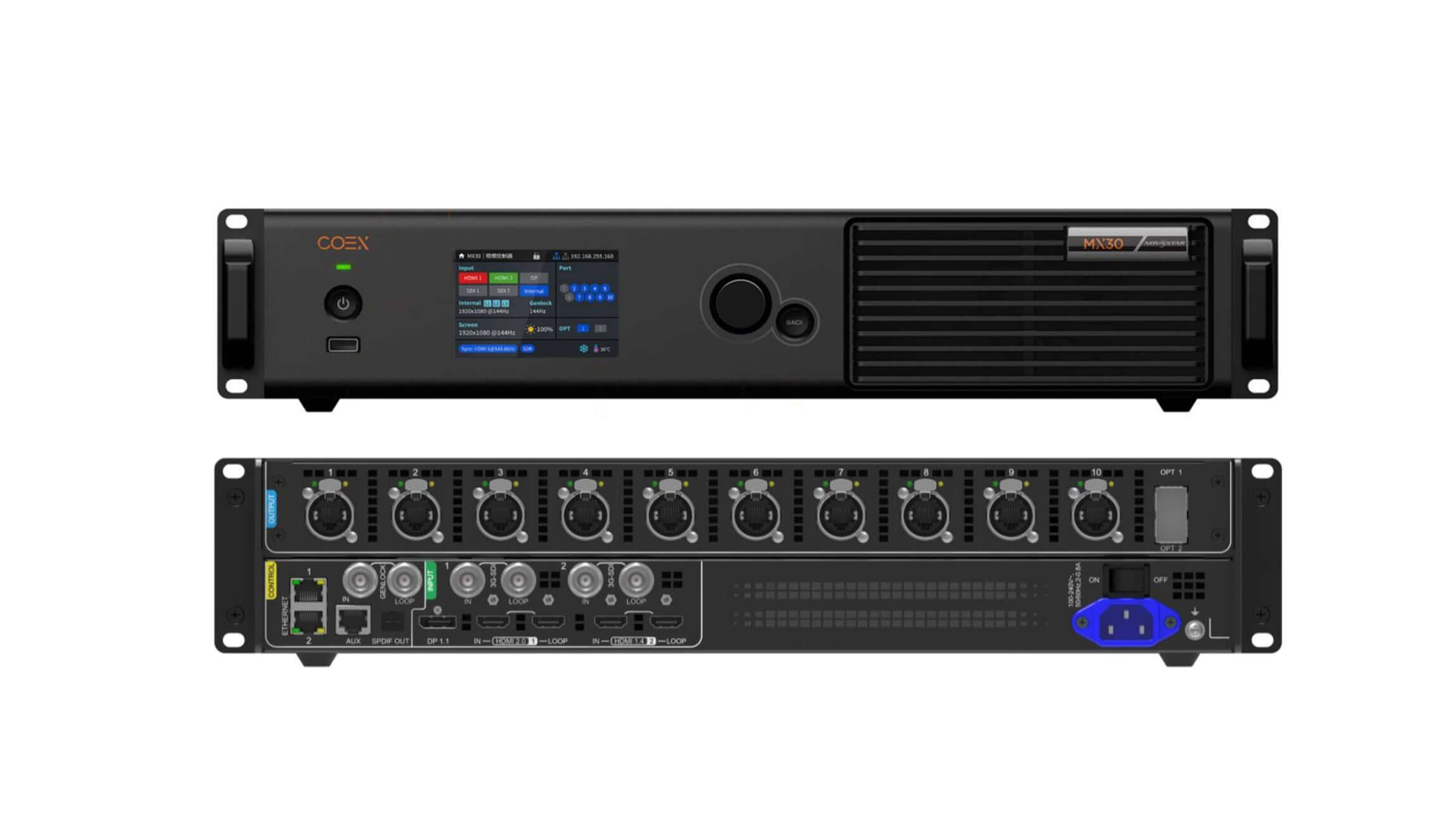
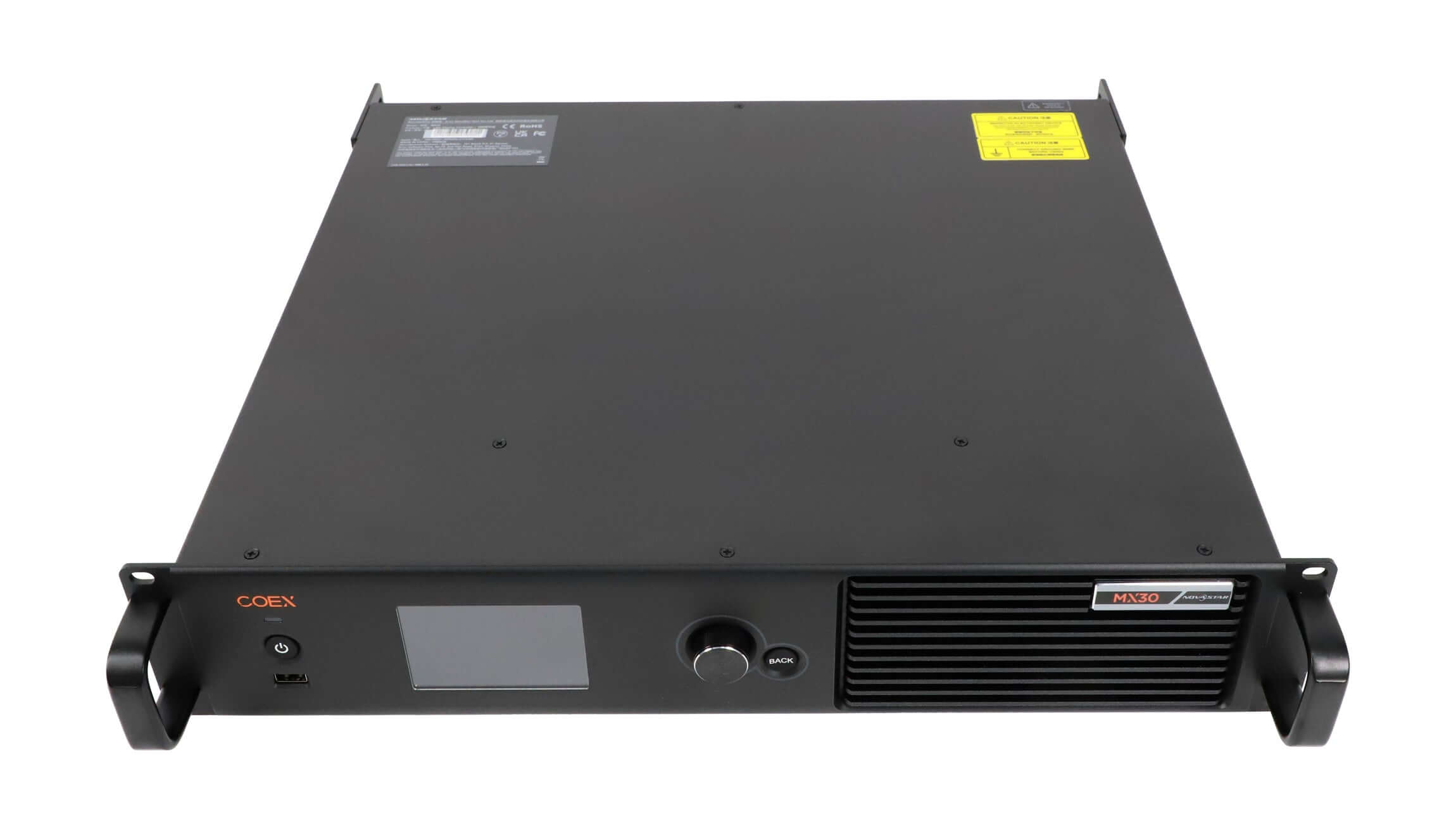
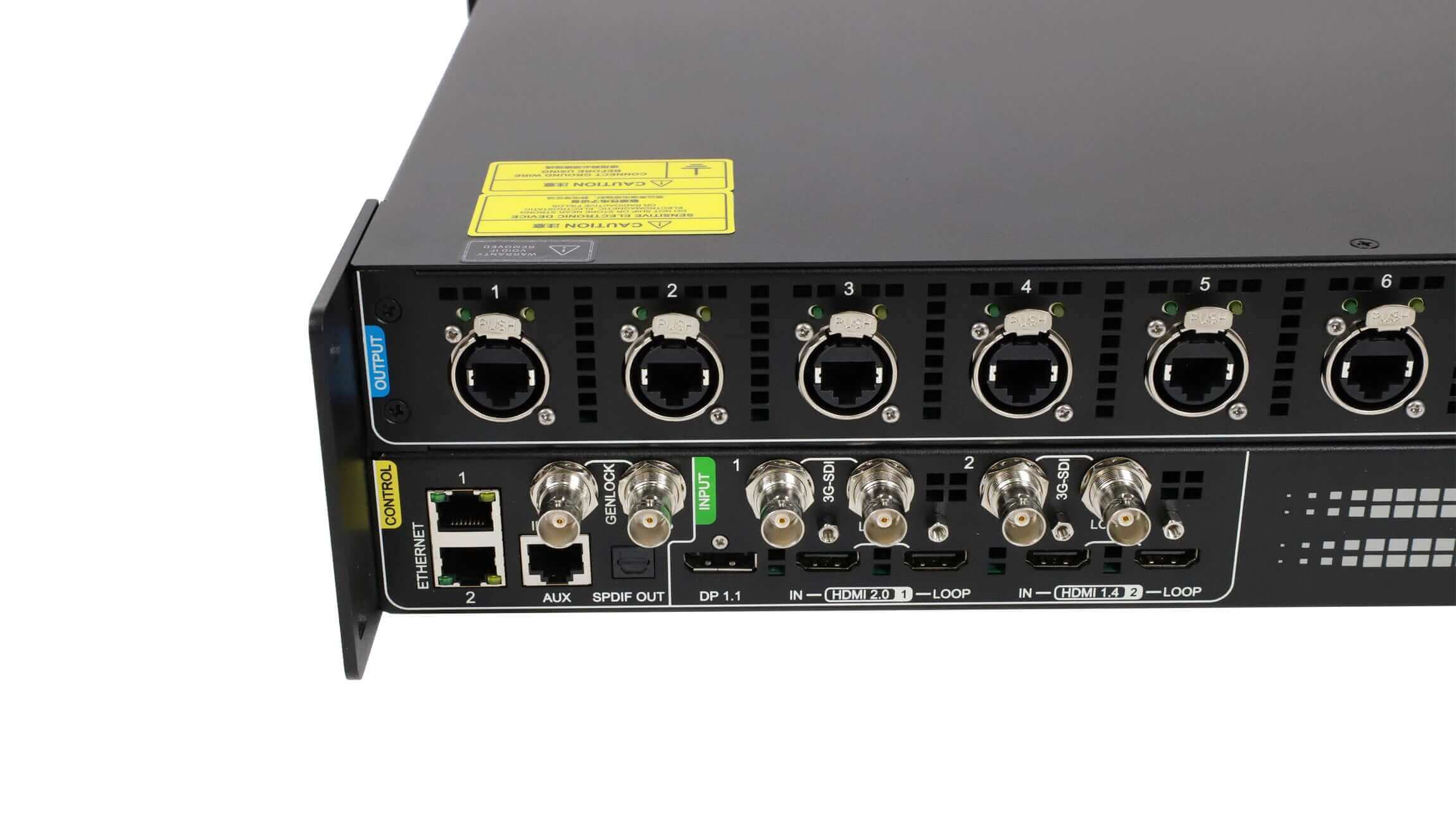
The MX30 is an all-in-one COEX LED display controller rather than a basic sending box. It combines video input processing, screen mapping, ten Gigabit Ethernet outputs, two 10G optical outputs, Genlock, loop-through connections, and VMP management in a rack-mounted chassis. That consolidation is valuable when a show needs fewer conversion devices and a predictable operator workflow.
The best candidate is an LED wall whose final mapped output is comfortably below 6.5 million pixels. Leaving headroom matters because the total pixel count is only the first limit. Bit depth, frame rate, receiving-card family, port distribution, backup design, and unusual canvas dimensions can reduce the practical capacity of a port or force a different mapping.
The MX30 is especially attractive when the system already uses compatible 1G NovaStar receiving cards. A buyer starting a new 5G cabinet fleet should compare a 5G COEX controller instead of assuming that ten 1G outputs are the best long-term cable architecture.
2. NovaStar MX30 Specifications That Drive the Buying Decision
A buying decision should separate input capability from LED output capacity. The MX30 can accept a 4K-class HDMI signal, but that does not mean it can drive every 4K-shaped or ultra-wide LED canvas at every bit depth and frame rate. Use the specifications below as system design limits, not as independent marketing claims.
| Decision area | MX30 capability | What the buyer should verify |
|---|---|---|
| Total LED load | Up to 6.5 million pixels | Final cabinet map, bit depth, frame rate, redundancy, and per-port loading |
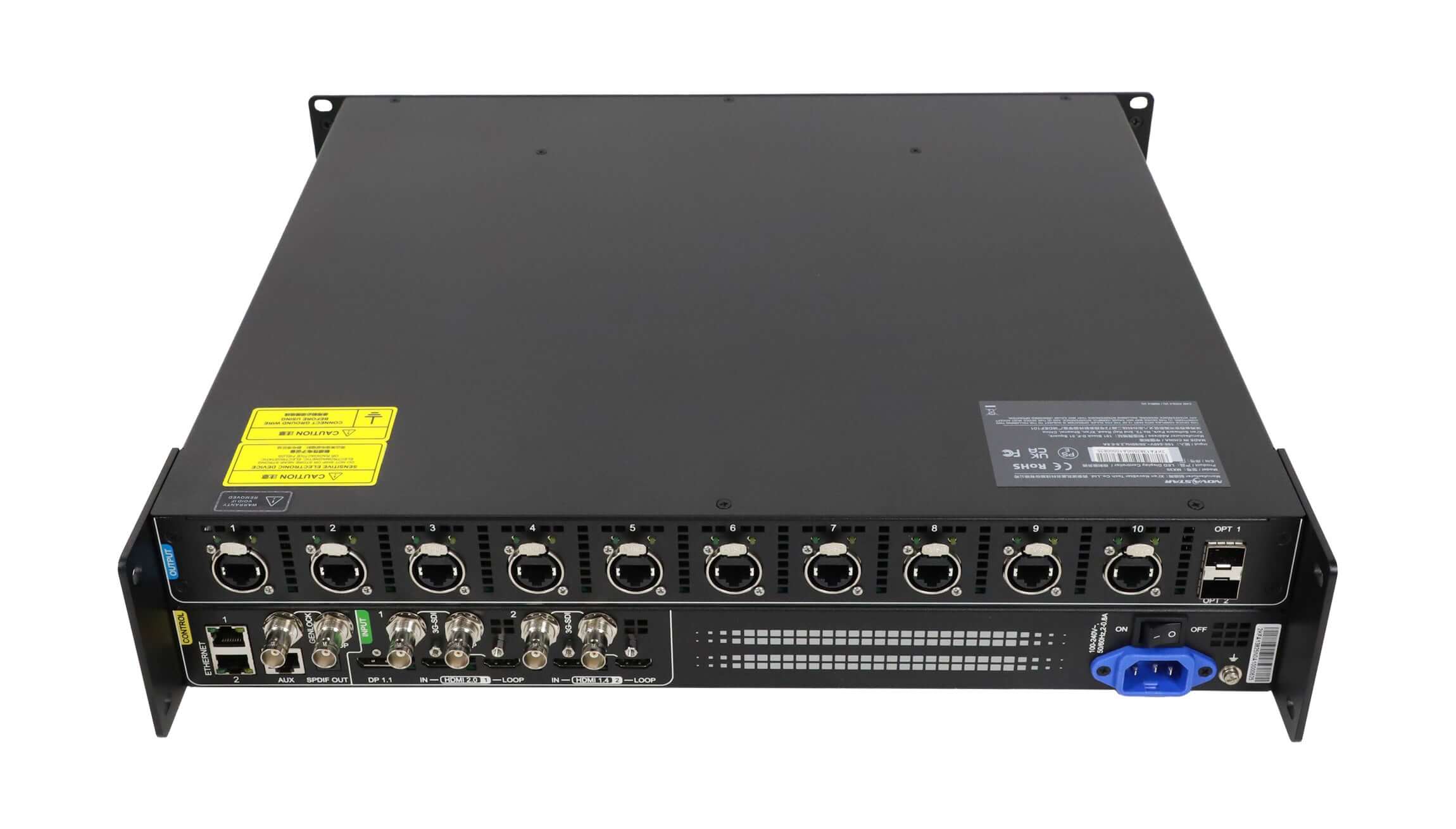
| LED outputs | 10 x Gigabit Ethernet; hot backup supported between Ethernet ports | Primary/backup port plan and receiving-card compatibility |
| Optical outputs | 2 x 10G optical; OPT 2 copies OPT 1 | Transceivers are not included by default; confirm fiber type and screen-side conversion |
| Main input | 1 x HDMI 2.0, up to 4096 x 2160 at 60Hz; forced width up to 8192 pixels | Source EDID, HDCP, frame rate, and actual content canvas |
| Additional inputs | 1 x HDMI 1.4, 1 x DP 1.1, 2 x 3G-SDI | Resolution and interlace support differ by connector |
| Synchronization | Genlock input and loop; Bi-Level, Tri-Level, and Blackburst | Reference format, frame rate, cascade design, and camera test |
| Processing | Scaling, three layers, HDR10/HLG, color tools, low-latency modes | Some functions and operating modes cannot be combined |
| Chassis | 482.6 x 94.2 x 466.7 mm; 7.2 kg; maximum 55 W | Rack depth, ventilation, power distribution, and service access |
Specifications checked against the official NovaStar COEX MX30 documentation. Confirm the current hardware revision, VMP release, and specification file before purchase.
2.1. Input and processing headroom
The HDMI 2.0 input is the main route for 4K at 60Hz, HDR10, or HLG content. HDMI 1.4 and DP 1.1 are useful additional sources but have lower maximum standard canvas capability. The two 3G-SDI inputs suit HD broadcast feeds and can deinterlace supported interlaced signals, while HDMI and DP inputs do not accept interlaced video.
In All-In-One mode, the MX30 provides scaling and layered composition with one frame of controller processing latency. Send-Only mode is the better choice when an upstream switcher or media server already creates the final canvas; it can reduce controller processing to zero-frame, specified as less than 1 ms. Always measure the complete signal chain, because cameras, switchers, converters, receiving cards, and panels add their own delay.
2.2. Output architecture and redundancy
Ten 1G Ethernet outputs make the MX30 familiar to rental companies and integrators with established NovaStar 1G cabinet inventories. At 8-bit and 60Hz, NovaStar lists up to 659,722 pixels per Ethernet port. At 10-bit and 60Hz, capacity is lower and depends on the receiving-card family. This is why a screen that fits the 6.5-million-pixel device total can still fail a per-port design check.
The optical ports are not two independent 10G screen canvases. OPT 1 carries the data for Ethernet ports 1 through 10, while OPT 2 is a copy channel. That design is useful for a redundant optical path, but it does not double the controller’s total loading capacity.
2.3. Control, cascading, and rack planning
Two Ethernet control ports include network switching, allowing up to 20 MX30 units to be cascaded on the control network without adding a switch for that local chain. The controller is managed in NovaStar VMP. For multi-controller systems, document IP addresses, firmware, device names, port maps, preset ownership, and which laptop holds the approved project file.
The chassis is deeper than its front panel suggests. Reserve rack depth for the 466.7 mm body plus connector bend radius, ventilation, and rear service access. The 41.2 dB(A) typical noise figure also deserves attention in quiet control rooms, worship spaces, and studios.
3. Calculate Whether 6.5 Million Pixels Is Enough
Calculate output pixels from the mapped LED canvas, not the resolution selected on the source laptop. Multiply the actual LED width in pixels by its height. If the system has separate canvases, calculate each mapped area and the combined total assigned to the controller.
| Example LED canvas | Pixel count | MX30 screening result |
|---|---|---|
| 3840 x 1080 | 4,147,200 | Fits the total-load limit with useful headroom; verify the port map |
| 4096 x 1536 | 6,291,456 | Fits narrowly; bit depth, redundancy, and port distribution need careful checking |
| 5120 x 1200 | 6,144,000 | Fits the total, but wide-canvas mapping and per-port height must be validated |
| 5120 x 1440 | 7,372,800 | Exceeds one MX30; use multiple controllers or a higher-capacity model |
| 7680 x 1080 | 8,294,400 | Exceeds output capacity even though an ultra-wide input timing may be accepted |
3.1. Derive resolution from cabinets and modules
For a cabinet-based wall, multiply the horizontal cabinet count by the cabinet pixel width, then do the same vertically. A wall that is 12 cabinets wide by 6 cabinets high, using 384 x 216-pixel cabinets, maps to 4608 x 1296 pixels, or 5,971,968 pixels. That fits the device total but leaves only about eight percent headroom.
Do not round cabinet resolution or rely on physical dimensions alone. Two screens with the same meter size can have very different pixel counts because of pixel pitch and cabinet construction.
3.2. Check every Ethernet port, not only the total
Divide the cabinet map into realistic data runs and calculate the pixels on each output. A neat-looking equal split is not always electrically or mechanically practical. Cable entry points, cabinet chain direction, backup paths, and maintenance zones may produce uneven loads. Keep every output below the applicable capacity for the selected frame rate, bit depth, and receiving card.
3.3. Allow headroom for future changes
A design at 6.45 million pixels can be technically valid yet commercially fragile. Adding one cabinet column, increasing bit depth, changing the frame rate, or introducing output redundancy may force a controller change. For permanent installations, practical headroom is usually more valuable than squeezing the last possible pixels from the device.
4. Match the MX30 Inputs to Your Production Workflow
4.1. HDMI and DisplayPort workflows
HDMI 2.0 is the preferred connection for 4K media servers, presentation systems, and switchers. Confirm the exact EDID before the show and test HDCP-protected content on the real source. A computer recognizing a 3840 x 2160 display does not prove that the LED cabinet mapping is correct; the input raster and output map are separate decisions.
Use HDMI 1.4 or DP 1.1 for secondary sources only after checking their resolution limits. The MX30 supports high frame-rate input timings, but usable output loading changes with frame rate and bit depth. Do not specify 120Hz or 144Hz simply because the connector list includes those timings.
4.2. 3G-SDI and Genlock workflows
Two 3G-SDI inputs and loop outputs simplify connection to HD cameras, routers, and broadcast switchers. The important limitation is bandwidth: 3G-SDI is not 12G-SDI. A production that expects native 4K SDI feeds should budget for conversion or choose a controller with the required SDI generation.
Genlock can align the controller with a production reference and reduce visible timing problems in multi-camera environments. It does not replace camera-to-screen testing. Shutter angle, panel refresh rate, scan design, receiving-card settings, and frame multiplication still determine whether the wall photographs cleanly.
4.3. Loop-through, audio, and control
HDMI and SDI loop outputs can distribute a source to additional devices. NovaStar specifies up to eight devices in one supported loop. Treat loop-through as a designed signal path: document the device order, cable length, power-up behavior, and what happens if an upstream unit is removed.
SPDIF output can take audio embedded in HDMI 2.0, HDMI 1.4, or DP 1.1. If the venue depends on this path, test sample rate, channel routing, mute states, and restart behavior with the production audio system.
5. Verify Receiving Cards, COEX Features, and Firmware
The controller, receiving cards, LED modules, and VMP software form one system. The MX30’s 10-bit per-port capacity changes when it works with A10s Pro, A8s Pro, and derivative receiving cards compared with other Armor-series cards. That difference can change whether a port map is valid.
Before ordering, request a cabinet-level bill of materials showing the exact receiving-card model and hardware revision. Then compare it with NovaStar’s current COEX compatibility information. Do not accept a quotation that lists only “NovaStar receiving card.” Features such as low latency, HDR processing, color management, frame multiplication, and image enhancement may have card, firmware, or mode restrictions.
Standardize firmware before commissioning, but do not upgrade a show system casually. Archive the known-good VMP installer, firmware packages, receiving-card configuration files, calibration data, and a rollback plan. A purchasing decision is incomplete until the supplier states who owns the configuration and who supports field recovery.
6. Where the MX30 Fits Best
| Application | Fit | Why | Main watch-out |
|---|---|---|---|
| Rental and live events | Strong | Ten familiar 1G outputs, fiber copy path, presets, scaling, and layered composition | Protect connectors and keep a tested backup map |
| House of worship or conference hall | Strong | 4K presentation input, simple front-panel control, Genlock, and centralized VMP management | Noise, volunteer workflow, and HDCP testing |
| Broadcast studio | Conditional | Dual 3G-SDI, Genlock, low latency, HDR, and color tools | No native 12G-SDI; run a full camera test |
| Virtual production | Conditional | Low-latency mode and synchronization can support modest 1G stages | Capacity, scan design, receiving cards, and camera performance may favor a higher-tier controller |
| Permanent corporate display | Strong | Integrated processing, remote management, optical transport, and compact system design | Define monitoring, spares, and long-term firmware ownership |
| Very large or 5G-native wall | Weak | The MX30 may require more controllers and more data cables | Compare a higher-capacity or 5G COEX platform |
Official NovaStar video: “Quick Look: MX30 Controller!” from the NovaStar YouTube channel.
7. When You Should Choose Another Controller
Choose another model when any hard requirement falls outside the MX30 architecture. The clearest trigger is output size: a wall above 6.5 million pixels needs multiple MX30 units or a controller with more loading capacity. Multiple units are valid, but they add Genlock, networking, backup, rack, power, and project-file complexity.
A 5G-native receiving-card fleet is another reason to compare alternatives. Higher-bandwidth outputs can reduce home-run cable count and change the optical transport design. For broadcast, native 12G-SDI may remove converters from a 4K signal chain. For complex canvases, more independent layers or additional 4K inputs may be more valuable than preserving a lower controller price.
EagerLED also offers NovaStar VX600 Pro and NovaStar VX1000 Pro controllers. Compare complete workflows and compatible receiving cards, not model numbers alone.
8. NovaStar MX30 Buying Checklist
- Record the exact LED map: cabinet count, cabinet resolution, total pixels, scan type, receiving-card model, and firmware.
- Calculate every port: confirm loading at the planned bit depth and frame rate, including primary and backup routes.
- List every source: connector, resolution, frame rate, HDCP, HDR, interlace, audio, and required loop outputs.
- Define processing mode: decide whether the MX30 scales and layers sources or operates in Send-Only mode behind a switcher.
- Design synchronization: document Genlock format, distribution, termination, and camera settings.
- Specify fiber completely: compatible optical modules, fiber type, connector type, length, cleaning tools, and spares. Optical modules are not included by default.
- Check the rack: allow chassis depth, cable bend radius, ventilation, support rails, service access, and acceptable noise.
- Confirm software ownership: VMP version, administrator laptop, licenses if applicable, project files, presets, and rollback packages.
- Buy operational spares: receiving cards, power supplies, data cables, optical modules, and a tested recovery USB drive.
- Require acceptance testing: run the real content, cameras, backup paths, and power sequence before final payment.

For a quotation and compatibility check, review the EagerLED NovaStar MX30 product page, browse LED receiving cards and controller accessories, or contact EagerLED with the cabinet map and source list.
9. Commission and Test the System Before Acceptance
9.1. Bench-test the complete signal chain
Build the chain with the production source, switcher, MX30, receiving cards, and at least one representative cabinet. Load the approved configuration, confirm that port assignments match labels, and verify color, grayscale, refresh, and brightness settings. Test every physical input and loop that the venue plans to use.
9.2. Test failures instead of only normal operation
Disconnect a primary data cable, interrupt the optical path, reboot the source, and restart the controller in the planned show order. Confirm that redundancy behaves as documented and that operators understand which alarms require action. A backup link that has never been disconnected is only a diagram.
9.3. Test with the real camera and content
Use the intended camera bodies, shutter settings, frame rates, lenses, and viewing distances. Display low-gray gradients, skin tones, saturated colors, fine text, fast motion, and black frames. Check for scan lines, tearing, moire, color shifts, and delayed transitions. Save the final VMP project and export diagnostic information after the system passes.
10. NovaStar MX30 FAQs
10.1. How many pixels can the NovaStar MX30 control?
The MX30 has a maximum device load of 6.5 million pixels. Practical capacity also depends on per-port loading, frame rate, bit depth, receiving-card family, screen mapping, and redundancy. Calculate the total wall and every Ethernet output before ordering.
10.2. Does the MX30 support 4K at 60Hz?
Yes. Its HDMI 2.0 input supports up to 4096 x 2160 at 60Hz, and it can accept forced ultra-wide or ultra-tall timings within the documented limits. Input capability does not increase the 6.5-million-pixel LED output limit.
10.3. How many Ethernet and optical outputs does the MX30 have?
It has ten Gigabit Ethernet LED outputs and two 10G optical outputs. OPT 1 transports the data for Ethernet ports 1 through 10, while OPT 2 is a copy of OPT 1. The second optical port does not double the device loading capacity.
10.4. Are optical modules included with the MX30?
No. NovaStar states that optical modules are not included by default. Specify compatible transceivers, fiber type, connector type, cable length, cleaning supplies, and spares as part of the complete system.
10.5. Is the MX30 suitable for broadcast and virtual production?
It can fit modest 1G broadcast or virtual-production stages because it provides Genlock, dual 3G-SDI, low-latency operation, HDR, and color tools. It does not provide native 12G-SDI, and final suitability depends on the receiving cards, panel scan design, refresh rate, camera settings, and total pixel load.
10.6. Can the MX30 run at less than 1 ms latency?
In Send-Only mode, NovaStar specifies zero-frame controller processing latency, or less than 1 ms. All-In-One processing adds one frame. Measure end-to-end latency because upstream video devices, receiving cards, and LED panels add delay.
10.7. What receiving cards work with the MX30?
The MX30 is designed for compatible 1G NovaStar receiving-card systems, but loading and advanced-feature support vary by model and firmware. Obtain the exact receiving-card hardware revision and verify it against the current COEX compatibility documentation before purchase.
10.8. Is the MX30 better than a basic sending box?
It is better when the system needs integrated scaling, layers, multiple professional inputs, Genlock, fiber transport, presets, color tools, and centralized VMP control. A basic sending box may be more economical when an external processor already supplies the final canvas and the LED wall is smaller and simpler.
11. Final Verdict
The NovaStar MX30 is the right controller when its 6.5-million-pixel ceiling, ten 1G outputs, receiving-card ecosystem, and input set align with the actual LED wall. Its strongest value is integration: 4K HDMI, HD-SDI, Genlock, optical transport, processing, low-latency operation, and VMP management can replace several separate devices.
The safest buying method is simple: calculate the cabinet map, validate every port at the intended bit depth and frame rate, confirm receiving-card compatibility, design redundancy and fiber as complete paths, then test the real sources and cameras. If those checks pass with sensible headroom, the MX30 is a practical professional choice. If they do not, move up or change architecture before the equipment reaches the venue.