
EagerLED Academy
NovaStar MRV Receiving Card Guide: MRV208-N vs MRV408-S vs MRV412 vs MRV416 vs MRV532

Nov
Choosing a NovaStar MRV receiving card is mostly a question of connectors, not pixel capacity. The MRV208-N, MRV408-S, MRV412-N, MRV412-S, MRV416-N and MRV416-S all list the same maximum load on our product pages: 512 x 512 pixels with PWM driver ICs and 512 x 384 pixels with common driver ICs, at 60 Hz from an 8-bit source. What separates them is the number of HUB75E connectors (8, 12 or 16) and therefore the number of module cables a single card can serve.
This guide is for service technicians and distributors who build or repair cabinets and need to pick the right card, or the right spare. It compares the models we stock, explains how to match a NovaStar MRV receiving card to a cabinet, covers the N and S versions, and lists the checks that prevent a wrong replacement. All figures come from the product pages in our store, which cite the conditions behind each value.
The MRV532 is included as well, because it uses a different connector, HUB320F, and suits a different kind of module.
1. What a NovaStar MRV receiving card does
A NovaStar MRV receiving card sits inside each LED cabinet. It receives display data from the sending device or all-in-one controller over Ethernet, takes the part of the image that belongs to its cabinet, and drives the modules through ribbon cables. It also stores the configuration that tells the modules how to scan, which driver IC they use and how pixels are mapped.
01. Where it sits in the system
The signal chain is: video source, controller or sending card, Ethernet cable, receiving card, module cables, modules. Each receiving card has two Ethernet ports so cabinets can be daisy-chained, and a power input that is fed from the cabinet power supply. The S-version pages list a DC input range of 3.8 to 5.5 V.
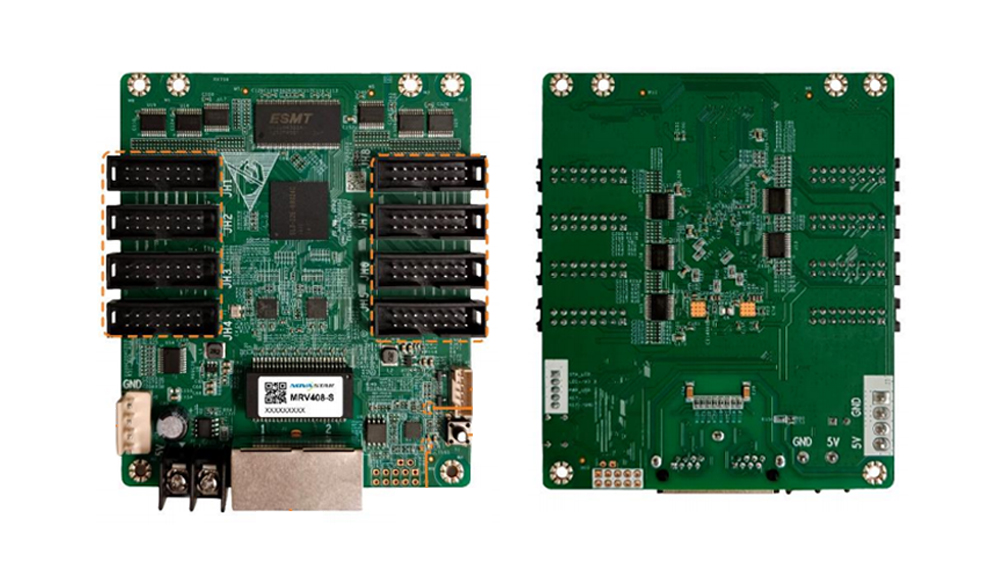
On the cards in this guide, the module connectors are built onto the card. That removes the separate hub board found in older cabinets, as explained in our LED hub card guide. The trade-off is that the card must have enough connectors for every module cable in the cabinet.

02. Why connectors matter more than pixels
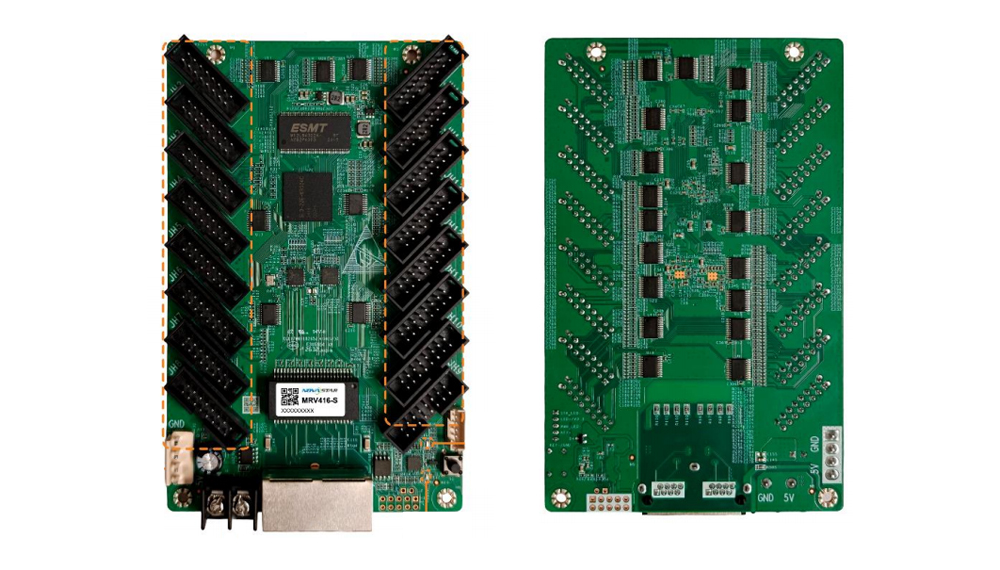
A HUB75E connector carries two groups of parallel RGB data. Eight connectors therefore give 16 groups, twelve give 24 and sixteen give 32. Each module cable usually occupies one connector, so the connector count sets how many modules or module strings one NovaStar MRV receiving card can drive. The pixel ceiling, by contrast, is the same across the HUB75E models in this guide.
03. Network ports, power and daisy-chaining
The cards pictured in this guide carry a dual Ethernet jack, marked 1 and 2, next to the power terminal. One port takes data from the controller or the previous cabinet, and the other passes it to the next cabinet in the chain. How many cabinets one controller port can feed depends on the controller, not on the card, so check the controller loading when you plan a long chain.
Power draw is small. The S-version pages list a rated power of 1.68 W for the MRV408-S and MRV412-S and 1.89 W for the MRV416-S, with actual consumption varying with settings and environment. In practice the receiving card is a minor load next to the modules, but it still needs a stable supply within the 3.8 to 5.5 V input range, so a loose power lead is a common cause of a card dropping out.
2. MRV models compared
The table below lists each NovaStar MRV receiving card we stock with onboard module connectors. Loading values are per card at 60 Hz. The MRV208-N page adds that its figures apply when used with M3 controllers and are not universal limits.
| Model | Module connectors | Parallel RGB data | Load, PWM driver IC (8-bit) | Load, common driver IC (8-bit) | Other published details |
|---|---|---|---|---|---|
| MRV208-N | 8 x HUB75E | 16 groups | 512 x 512 | 512 x 384 | 10-bit: 512 x 256 (PWM), 512 x 192 (common), with M3 controllers |
| MRV408-S | 8 x HUB75E | 16 groups | 512 x 512 | 512 x 384 | 1.68 W rated; 91.6 x 107.5 x 19.3 mm; 73.7 g |
| MRV412-N | 12 x HUB75E | 24 groups | 512 x 512 | 512 x 384 | Lists color management, 18bit+, low latency and 3D |
| MRV412-S | 12 x HUB75E | 24 groups | 512 x 512 | 512 x 384 | 1.68 W rated; 91.5 x 144.0 x 19.3 mm; 93.5 g |
| MRV416-N | 16 x HUB75E | 32 groups | 512 x 512 | 512 x 384 | Same function list as MRV412-N |
| MRV416-S | 16 x HUB75E | 32 groups | 512 x 512 | 512 x 384 | 1.89 W rated; 91.5 x 144.0 x 19.3 mm; 106.8 g |
| MRV532 | 10 x HUB320F | 40 groups RGB, 40 groups 3-color sub-pixel or 30 groups 4-color sub-pixel | 512 x 512 | Designed for PWM driver ICs | 10-bit or 12-bit sources: up to 512 x 384 |
Two practical conclusions follow. For HUB75E cabinets, a larger model number does not buy more pixels; it buys more connectors. And the MRV532 is a separate branch: its HUB320F connectors and PWM-only design mean it is chosen for modules built for that interface, not as an upgrade path from the HUB75E cards.
For a new build, the choice between the N and S version of the same connector count comes down to what the rest of the project uses. The S-version pages in our store follow manufacturer specifications V1.0.0 dated September 18, 2026, and list rated power, size and weight; the N-version pages list the full function set. If the wall will be serviced alongside existing cabinets, choose the same NovaStar MRV receiving card version those cabinets already use, so spares and configuration files stay interchangeable. If it is a completely new wall, confirm with your controller setup which version you will standardize on, and keep it consistent across every cabinet.
3. How to match a NovaStar MRV receiving card to your cabinet
Match a NovaStar MRV receiving card to a cabinet in three steps: count the module cables, check the cabinet pixel count against the driver IC type, and confirm the physical fit.
01. Count the module cables
Open the cabinet and count the ribbon cables that run from the card or hub board to the modules. If the cabinet has 8 cables, an 8-connector card fits. With 12 cables, you need a 12-connector card such as the MRV412-N or MRV412-S. With 16, you need an MRV416 model. A card with fewer connectors than cables will leave modules dark, no matter how much pixel capacity it has.
02. Check pixels against the driver IC
Multiply the cabinet’s pixel width by its pixel height and compare it with the limit for your module driver IC. PWM driver ICs allow up to 512 x 512 pixels (262,144) per card at 8-bit; common driver ICs allow up to 512 x 384 (196,608). Most cabinets are well inside these limits. For example, a 500 x 500 mm (19.7 x 19.7 in) cabinet at 2.6 mm pitch has about 192 x 192 pixels, or 36,864 pixels, which is far below either limit. The check matters for large or fine-pitch cabinets and for 10-bit sources, where the MRV208-N page lists lower limits of 512 x 256 and 512 x 192.
03. Confirm the physical fit
The 12- and 16-connector S cards measure 91.5 x 144.0 mm (3.6 x 5.7 in), while the 8-connector MRV408-S measures 91.6 x 107.5 mm (3.6 x 4.2 in). If you are replacing a smaller card with a larger one, check the mounting holes and the clearance for the angled connectors and cables.
04. A worked example
Consider a fixed-install cabinet that holds twelve 320 x 160 mm (12.6 x 6.3 in) modules at 2.5 mm pitch, arranged three wide and four high. Each module has 128 x 64 pixels, so the cabinet is 384 x 256 pixels, or 98,304 pixels. Each module has its own HUB75E cable, so the cabinet needs 12 connectors.
On pixel load, any NovaStar MRV receiving card in Table 1 would cope: 98,304 pixels is well below even the 512 x 384 common-driver limit. On connectors, only the 12- and 16-connector cards fit. The MRV412-N or MRV412-S covers the cabinet exactly, while an MRV416 would leave four connectors unused. An 8-connector card such as the MRV208-N or MRV408-S would leave four modules without data. This example uses assumed module dimensions; use your own module and cabinet data when you size a real project.
| Check | How to find it | What it decides |
|---|---|---|
| Number of module cables | Count the ribbon cables in the cabinet | 8, 12 or 16 HUB75E connectors, or another interface |
| Module connector type | Read the module input silkscreen | HUB75E cards versus HUB320F (MRV532) or a hub board |
| Driver IC model | Chip marking on the module, or the configuration file | PWM or common driver limit; PWM is required for the MRV532 |
| Cabinet pixel resolution | Module pixels multiplied by modules per row and column | Whether the card’s load limit is enough |
| Source bit depth | Controller settings | 10-bit lowers the per-card limit on the MRV208-N |
| Controller model | Label on the sending device | Compatibility and features such as 3D |
| Mounting space | Measure the old card and its holes | Whether a larger card fits the cabinet |
4. Replacing a NovaStar MRV receiving card: N, S and configuration files
Replacement is where most mistakes happen. Several models come in N and S versions with the same connector count and the same published load, such as the MRV412-N and MRV412-S. Our MRV412-S page is explicit that similar model names and shared features do not establish a direct replacement, so check the wiring and configuration for the selected card.
01. Record the working setup first
Before removing a card, write down the exact model and version from its label, the firmware version and the configuration file. The MRV208-N page recommends recording the current firmware and configuration before removing the original card. The product pages also ask buyers to confirm the hardware revision, firmware, driver IC and existing cabinet configuration before ordering a replacement.
02. Send the right details with your order
For a compatibility check, the MRV208-N page lists what to send: module driver IC model, scan mode, cabinet pixel resolution, controller model and the existing configuration file. A matching HUB75E connector alone does not prove that an existing cabinet configuration will work on the new card.
03. Test one card before a batch
When you replace several cards, load the configuration on one new NovaStar MRV receiving card first, check the cabinet image and any calibration data, then order or install the rest. This catches firmware and mapping issues before they spread across a wall.
04. Keeping spares
A spare NovaStar MRV receiving card is one of the cheapest ways to shorten downtime. For rental walls that tour, keep at least one spare of each model and version in use, already loaded with the correct firmware and a copy of the configuration file. For fixed installations, store the spare with a printed note of the model, version and firmware so a technician who has never seen the wall can swap it quickly. If a wall mixes N and S cards, keep spares of both rather than assuming one can stand in for the other.
| Item | Why it matters |
|---|---|
| Exact model and version (for example MRV412-N or MRV412-S) | Similar names do not guarantee a direct replacement |
| Firmware version | The new card may need matching firmware for the existing setup |
| Configuration file | Holds scan mode, driver IC settings and pixel mapping |
| Calibration coefficients, if used | Lost coefficients cause visible color or brightness differences |
| Photos of the cabinet wiring | Shows which connector feeds which module |
| Controller model | Some functions depend on the controller |
5. Image functions and their conditions
The N cards list a wide set of image functions. The MRV412-N page names color management with standard gamuts (Rec.709, DCI-P3 and Rec.2020) and custom gamuts, 18bit+, pixel-level brightness and chroma calibration, quick adjustment of dark or bright lines, multi-batch adjustment, low latency, 3D, individual RGB gamma adjustment and 90-degree image rotation.
01. Functions that depend on the rest of the system
Some of these only work with the right partners. The MRV208-N page states that 3D requires a supporting controller and that the low-latency mode requires modules whose driver ICs have built-in RAM. Ask for a review of the complete controller-to-module combination rather than choosing a NovaStar MRV receiving card by its function list alone.
02. Maintenance features
The MRV208-N page also lists calibration coefficient management and upload, data group mapping, Mapping 1.1 for locating receiving cards, stored-image settings, temperature and voltage monitoring, cabinet LCD support and bit-error detection. These help on site: Mapping 1.1 shows which card sits in which cabinet, and bit-error detection helps trace a faulty network cable.
03. Calibration data and the card
On walls that have been calibrated, the brightness and chroma coefficients are part of what makes the image uniform. The MRV208-N page lists calibration coefficient management and upload among its maintenance functions. Before replacing a NovaStar MRV receiving card on a calibrated wall, make sure you have a copy of the coefficients for that cabinet, so they can be uploaded to the new card. Without them, the replaced cabinet can look slightly brighter or a different shade from its neighbors.
04. Where the MRV532 differs
The MRV532 page lists seam correction with a mobile app, pixel-level calibration, quick adjustment of dark or bright lines, low latency, 3D and 90-degree rotation. Its HUB320F connectors support up to 40 groups of RGB real-pixel data, 40 groups of 3-color sub-pixel data or 30 groups of 4-color sub-pixel data, which suits modules designed around that interface.

Frequently asked questions
What is the difference between the MRV412 and MRV416?
The connector count. The MRV412 models have 12 HUB75E connectors and 24 RGB data groups; the MRV416 models have 16 connectors and 32 groups. Both list the same maximum load of 512 x 512 pixels with PWM driver ICs and 512 x 384 with common driver ICs at 8-bit and 60 Hz.
Can an MRV412-S replace an MRV412-N?
Do not assume it. Our MRV412-S page states that similar model names and shared features do not establish a direct replacement. Send the existing configuration file, firmware version, driver IC and controller model so the match can be checked.
Does a NovaStar MRV receiving card with more connectors drive more pixels?
Not among the HUB75E models in this guide. The 8-, 12- and 16-connector cards share the same pixel limit. More connectors let one card serve more module cables in the same cabinet.
Is the MRV532 a direct upgrade from HUB75E cards?
No. The MRV532 uses HUB320F connectors and is designed for PWM driver ICs, so it fits modules built for that interface. It cannot plug into HUB75E module cables without a matching module design.
How many receiving cards does one cabinet need?
Usually one. A single NovaStar MRV receiving card covers a typical cabinet, provided it has enough connectors for every module cable and the cabinet pixel count is within its limit for your driver IC. Very large cabinets, or cabinets with more module cables than the largest card offers, may need a different card or a split layout, which should be checked against the configuration.
Do I still need a hub board with these cards?
Not for HUB75E modules. The connectors are on the card. A hub board is only needed when modules use a different interface or when the cabinet layout calls for one.
Ordering receiving cards for your cabinets
You can compare full specifications on our product pages for the MRV208-N, MRV412-N, MRV412-S, MRV416-S and MRV532, or browse the full LED receiving card range. If you are also choosing the controller, see our NovaStar VX Pro comparison.
For a compatibility check before you order, send us your cabinet details: the current card model and version, number of module cables, module driver IC, scan mode, cabinet pixel resolution, controller model and the existing configuration file, plus the quantity you need. Installation and product videos are also available on the EagerLED YouTube channel.