
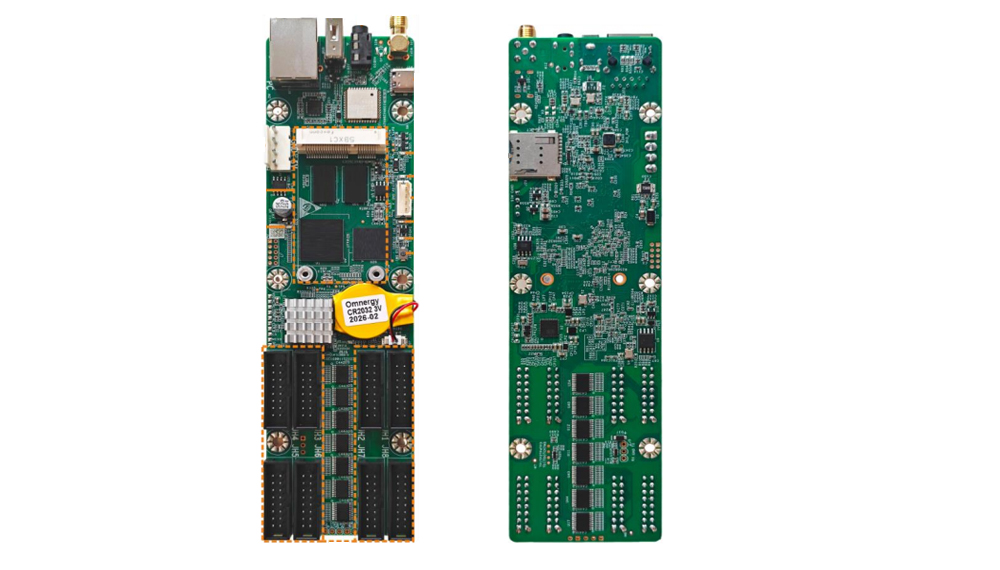
NovaStar TCC80 Asynchronous LED Control Card with 8 HUB75E
$ 72.00
NovaStar TCC80 combines sending and receiving functions with 8 HUB75E connectors, USB playback and Wi-Fi control. Review the documented loading limits, synchronized-playback conditions and optional 4G/GPS accessories before selecting a configuration.
9999 in stock
NovaStar TCC80 asynchronous LED control card
The NovaStar TCC80 combines sending and receiving functions on one board, with eight HUB75E connectors for LED modules. It supports content publishing and screen control from a computer, phone or tablet, making it suitable for small storefront, shelf, lamp-post and vehicle-mounted displays.
TCC80 specifications
The following values come from the original TCC80 Specifications V1.0.0, released April 30, 2026.
| Module connectors | 8 standard HUB75E connectors |
|---|---|
| Documented loading condition | 512 × 320 at 60 Hz, 8-bit depth, for PWM and general driver ICs, including ICN1065 and ICN1063 |
| Maximum width and height | 2048 pixels; the specification separately states a total load within 160,000 pixels |
| Output data | Up to 16 parallel RGB groups or 48 serial data groups; serial data expansion is not supported |
| Processor | Quad-core 1.4 GHz industrial-grade processor |
| Memory / storage | 1 GB RAM / 32 GB storage |
| Video playback | 1 × 1080p, 2 × 720p, 2 × 480p or 4 × 360p videos; hardware decoding of 1080p video |
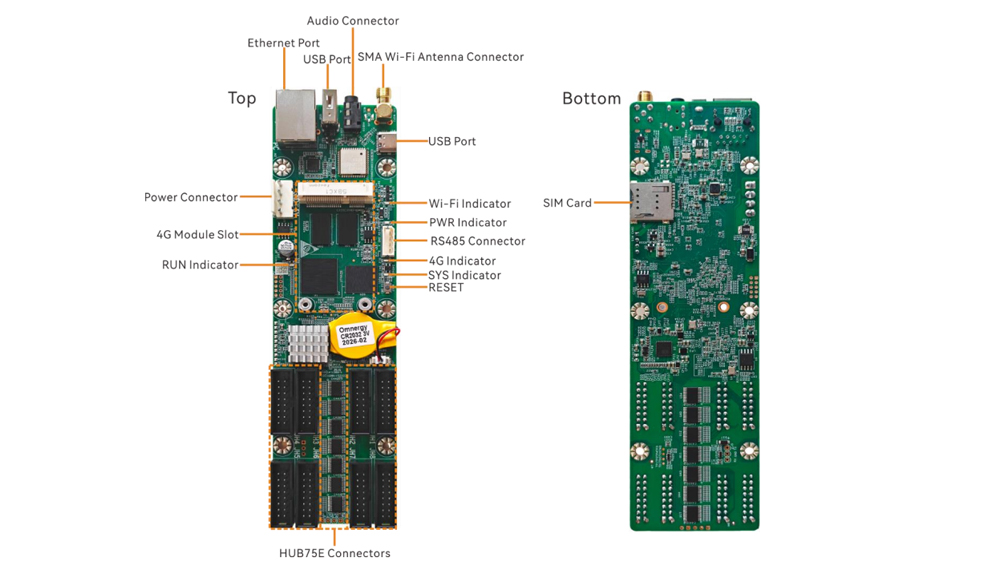
| USB ports | 1 × USB 2.0 Type-A; 1 × USB 2.0 Type-C |
| Network / sensor connection | 1 × Fast Ethernet port; 1 × RS485 connector |
| Audio output | 1 × 3.5 mm audio output |
Loading clarification: the PDF lists both 512 × 320 and a total load within 160,000 pixels. These figures are not numerically identical. Confirm the supported screen layout before ordering; do not assume that the maximum width and maximum height can be used together. The 60 Hz figure is a loading condition, not an LED module refresh-rate specification.
Content publishing and connections
Use USB Type-A for USB playback, upgrades and storage expansion. USB Type-C connects a control computer for content publishing and screen control. The Fast Ethernet port supports a computer, local network or public network connection. RS485 connects compatible light, temperature and humidity sensors or other supported modules.
The built-in Wi-Fi hotspot and Wi-Fi station mode can operate at the same time. Remote publishing and monitoring depend on the network connection and the corresponding platform setup.
Multi-screen playback and optional 4G/GPS
TCC80 supports synchronized playback using NTP or GPS time synchronization. The specification states that enabling synchronized playback halves the device’s decoding capability, so check the planned video layout before enabling it.
The standard TCC80 ships without a 4G module; it must be purchased separately if required. GPS positioning and time synchronization require a 4G module and GPS antenna. Confirm the supplied accessories for your selected configuration.
Display adjustment and maintenance
Supported receiving functions include color management, 18bit+, RGB gamma adjustment and rotation in 90-degree steps. RGB gamma adjustment requires NovaLCT and supporting control hardware. Mapping 1.0 displays card and Ethernet-port information for tracing the installation.
Temperature and voltage monitoring help with diagnosis. Firmware and configuration readback allow maintenance files to be saved locally. Dual program backup and configuration backup are separate recovery functions; keep a copy of the working module configuration before changing a board.
TCC80 frequently asked questions
Does TCC80 combine sending and receiving functions?
Yes. Both functions are integrated on the board, which provides eight HUB75E connectors for the LED modules. Check the module pinout, driver IC, scan settings and screen load before connection.
How many pixels can TCC80 control?
V1.0.0 lists 512 × 320 at 60 Hz with 8-bit depth, and separately specifies a total load within 160,000 pixels. Because those figures differ, confirm your exact screen dimensions and configuration before relying on the limit.
Is a 4G module included, and what does GPS need?
The specification says TCC80 ships without a 4G module. GPS positioning and time synchronization require a 4G module and GPS antenna; check the order configuration for these accessories.
Does synchronized playback affect video capacity?
Yes. The documented decoding capability is halved when synchronized playback is enabled. Check the number and resolution of videos in your planned multi-screen program.
What is the difference between the two USB ports?
The Type-A port supports USB playback, upgrades and storage expansion. The Type-C port connects the control computer for content publishing and screen control.
Download the TCC80 specification
NovaStar TCC80 Asynchronous LED Display Control Card Specification
| Weight | 0.5 kg |
|---|
Be the first to review “NovaStar TCC80 Asynchronous LED Control Card with 8 HUB75E”
You must be logged in to post a review.
Will I be charged with customs and taxes?
The prices displayed on our site are tax-free (in US Dollars), which means you may be required to pay import duties and taxes once you receive your order. Import taxes, duties, and related customs fees will be determined by your local customs office when your order arrives at its final destination.
Please note that these additional charges and taxes are your responsibility, and we do not take any responsibility for them. We are not liable for paying or reimbursing any customs duties, taxes, or related fees. For more details on these charges, please contact your local customs office.
Shipping
We can ship to virtually any address in the world. Note that there are restrictions on some products, and some products cannot be shipped to international destinations..
When you place an order, we will estimate shipping and delivery dates for you based on the availability of your items and the shipping options you choose. Depending on the shipping provider you choose, shipping date estimates may appear on the shipping quotes page.
Please also note that the shipping rates for many items we sell are weight-based. The weight of any such item can be found on its detail page. To reflect the policies of the shipping companies we use, all weights will be rounded up to the next full pound..
Returns Policy
You may return most new, unopened items within 30 days of delivery for a full refund. We'll also pay the return shipping costs if the return is a result of our error (you received an incorrect or defective item, etc.)..
You should expect to receive your refund within four weeks of giving your package to the return shipper, however, in many cases you will receive a refund more quickly. This time period includes the transit time for us to receive your return from the shipper (5 to 10 business days), the time it takes us to process your return once we receive it (3 to 5 business days), and the time it takes your bank to process our refund request (5 to 10 business days).
If you need to return an item, simply login to your account, view the order using the "Complete Orders" link under the My Account menu and click the Return Item(s) button. We'll notify you via e-mail of your refund once we've received and processed the returned item..
Related products

Reviews
There are no reviews yet.