
EagerLED Academy
Huidu A Series LED Players Compared: HD-A3L, A4L, A5L, A6L, A7 and A8

Nov
The Huidu A series is a family of LED display players that store and play content on their own, and the dual-mode models can also show a live HDMI source. The models we stock range from the HD-A3L, which drives up to 655,360 pixels from stored programs only, to the HD-A8, which drives up to 8.29 million pixels from stored content or 10.4 million from a live source. To choose one, match the screen’s pixel count to the model’s loading capacity, decide whether you need live HDMI input, and count the receiving card connections.
This guide is for integrators and distributors who build advertising and information screens and need to pick the right Huidu A series player. It compares the current models using the specifications on our product pages, shows how to size a screen, explains how the players connect to Huidu HD-R receiving cards, and covers network management and replacement of older models.
Where a product page cites a manufacturer specification version, the figures follow that version. Video decoding and LED output are separate specifications: a player that decodes a 4K video file does not automatically drive a 4K LED canvas.
1. What a Huidu A series player does
A Huidu A series player sits between the content and the LED cabinets. It holds programs in onboard storage, plays them on a schedule, and sends the image over Gigabit Ethernet to Huidu HD-R receiving cards in each cabinet. No computer has to stay connected for the screen to run.
01. Asynchronous and dual-mode operation
Asynchronous playback means the player shows stored programs: videos, images, text, clocks and similar content uploaded in advance. The HD-A3L works this way only; its page states that it is not a live HDMI-input controller. Dual-mode models add synchronous playback, where the screen follows a live source such as a computer or media player connected over HDMI. The HD-A4L, HD-A5L and HD-A6L list an HDMI input for this, and the HD-A7 and HD-A8 list HDMI and DisplayPort sources.

02. Where these players fit
Typical uses are shop-front and roadside advertising screens, information screens in public buildings and campuses, and screens that must run unattended on a schedule. The older HD-A3 page lists community information screens, advertising machines and advertising vehicles as examples. When a screen also needs to show a live presentation or broadcast at times, a dual-mode Huidu A series model covers both jobs in one box.
03. Do you need asynchronous or dual-mode?
Ask how the screen will be used day to day. If it plays the same advertising loop or notices every day and content is updated over the network or by USB, an asynchronous player is enough and the HD-A3L is the simplest Huidu A series option. If the screen sometimes needs to show a live presentation, a camera feed or a computer desktop, choose a dual-mode model so the operator can switch to HDMI without changing hardware. Dual-mode players can still run stored programs most of the time, so they cover both cases at a small extra cost.
2. Huidu A series models compared
The table lists each current model’s loading capacity, outputs and main features as given on our product pages.
| Model | Playback | Loading capacity | LED outputs | Live input | Other listed details |
|---|---|---|---|---|---|
| HD-A3L | Asynchronous only | 655,360 pixels | 1 Gigabit | None | 16 GB storage; Wi-Fi STA and LedArt app; XiaoHui Cloud; optional 4G; 1 sensor input |
| HD-A4L | Dual-mode | 655,360 pixels | 2 Gigabit | 1 HDMI | 16 GB storage; USB 2.0 OTG and USB 3.0; optional 4G/5G; 2 sensor inputs |
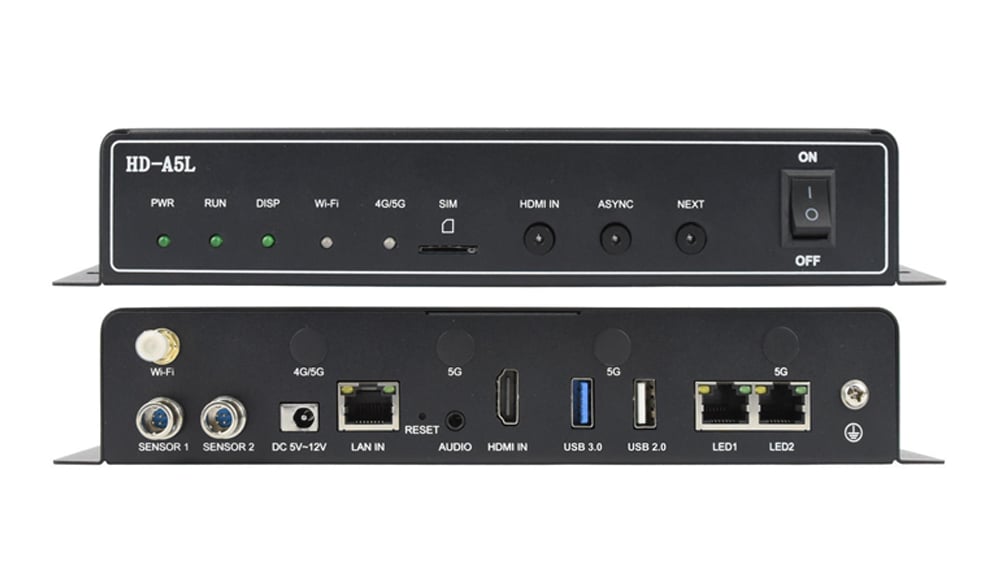
| HD-A5L | Dual-mode | About 1.3 million pixels | 2 Gigabit | 1 HDMI 1.4 with adaptive scaling | 2 GB RAM, 16 GB storage; Android 11; up to 2 x 4K or 6 x 1080p video windows |
| HD-A6L | Dual-mode | 2.6 million pixels | 4 Gigabit | HDMI | 16 GB storage; 2.4 GHz and 5 GHz Wi-Fi |
| HD-A7 | Dual-mode, 4K-capable | 5.16 million (async) or 5.2 million (sync) | 8 Gigabit | HDMI and DP | 32 GB storage; dual-band Wi-Fi |
| HD-A8 | Dual-mode, 4K | 8.29 million (async) or 10.4 million (sync) | 16 Gigabit | HDMI and DP | 32 GB storage; 1 x 4K or 4 x 1080p video windows; specification V2.3 |
Two points stand out. The HD-A3L and HD-A4L share the same 655,360-pixel capacity; the A4L adds a second LED output, the HDMI input and a second sensor input. And from the HD-A5L upward, capacity roughly doubles with each step: about 1.3, 2.6, 5.2 and 10.4 million pixels in synchronous mode.

01. Entry level: HD-A3L and HD-A4L
Both suit small screens up to 655,360 pixels, such as 1,280 x 512 pixels. Choose the HD-A3L when the screen only plays scheduled content. Choose the HD-A4L when a live HDMI source is needed at times, or when the cabinet layout benefits from two LED outputs.
02. Mid range: HD-A5L and HD-A6L
The HD-A5L doubles capacity to about 1.3 million pixels and lists multi-window video playback, Android 11 and an 18 W maximum power draw. The HD-A6L doubles again to 2.6 million pixels with four LED outputs and dual-band Wi-Fi, which covers a 1920 x 1080 screen.
03. Large screens: HD-A7 and HD-A8
The HD-A7 and HD-A8 move to a rack-style chassis with HDMI and DisplayPort inputs. The A7 lists eight LED outputs and about 5.2 million pixels; the A8 lists sixteen outputs and up to 10.4 million pixels in synchronous mode. Both list 32 GB of storage for larger content libraries.
04. Storage and video windows
Storage decides how much content a screen can hold without a network connection. The HD-A3L, HD-A4L and HD-A5L list 16 GB, the HD-A6L also lists 16 GB, and the HD-A7 and HD-A8 list 32 GB, with USB expansion supported on the pages that mention it. For split-screen layouts, the HD-A5L lists up to two 4K, six 1080p, ten 720p or twenty 360p video windows, and the HD-A8 lists one 4K or four 1080p windows. If the design shows several video zones at once, check the window count of the Huidu A series model before choosing on pixel capacity alone.
3. Sizing a screen for a Huidu A series player
Multiply the screen’s pixel width by its pixel height and compare the result with the loading capacity in Table 1. The HD-A3L page gives its own example: 1,280 x 512 equals 655,360 pixels, exactly its limit, while a 1,920 x 1,080 screen at 2,073,600 pixels exceeds it.
| Screen resolution | Total pixels | Smallest model on paper |
|---|---|---|
| 1280 x 512 | 655,360 | HD-A3L (stored content) or HD-A4L (with live HDMI) |
| 1280 x 1024 | 1,310,720 | HD-A5L |
| 1920 x 1080 | 2,073,600 | HD-A6L |
| 2560 x 1440 | 3,686,400 | HD-A7 |
| 3840 x 1080 | 4,147,200 | HD-A7 |
| 3840 x 1920 | 7,372,800 | HD-A8 |
01. Leave some margin
A screen exactly at the limit, like 1,280 x 512 on the HD-A3L, has no room for a later extension. If the screen might grow, or if the cabinet layout does not divide evenly across the outputs, choose the next model up. The step up usually costs less than replacing a player that has run out of capacity, and it also leaves room for higher-resolution content, extra video windows or a later change of module pitch.
02. Width and height limits
The HD-A5L page lists a maximum width of 16,384 pixels with reduced loading capacity and a maximum height of 4,096 pixels, and states that these are separate limits rather than a supported 16,384 x 4,096 canvas. Very long, narrow banner screens should therefore be checked against the width limit as well as the total pixel count.
03. Asynchronous versus synchronous capacity
On the HD-A7 and HD-A8, capacity differs by mode. The HD-A8 lists 8.29 million pixels for stored content and 10.4 million for a live source. If the screen will run mostly stored programs, size it against the asynchronous figure.
04. A worked example
Consider a shop-front screen built from cabinets of 128 x 128 pixels, arranged ten wide and four high. That gives 1,280 x 512 pixels, or 655,360 pixels, which is exactly the capacity of the HD-A3L and HD-A4L. Either fits on paper, but with no margin. If the owner may add a row of cabinets later, the screen would grow to 1,280 x 640 pixels, or 819,200 pixels, which exceeds both. In that case the HD-A5L, at about 1.3 million pixels, is the safer Huidu A series choice from the start. This is an illustrative calculation with assumed cabinet sizes; use your own cabinet data for a real project.
4. Receiving cards for Huidu A series players
Every Huidu A series player sends data to Huidu HD-R receiving cards in the cabinets, and the card choice affects how the screen looks as much as the player does. The players’ pages refer to compatible HD-R series cards, so plan the player and the receiving cards together.

01. The HD-R708 as an example
The HD-R708 page lists eight HUB75E outputs, support for conventional driver ICs and most PWM ICs, and scan modes from static to 1/128 scan. Its recommended loading is 128 x 512 pixels with conventional ICs and 256 x 512 pixels with PWM ICs. Count the module cables in each cabinet and check the driver IC before choosing the card; our LED hub card guide explains how to read module connectors.
| Check | Why it matters |
|---|---|
| Module connector type (for example HUB75E) | The card’s connectors must match the module input |
| Number of module cables per cabinet | The HD-R708 has eight outputs; more cables need a different card |
| Driver IC type | Recommended loading differs: 128 x 512 (conventional) or 256 x 512 (PWM) on the HD-R708 |
| Scan mode | Must fall within the card’s supported range |
| Cabinet pixel resolution | Determines how many cabinets one player output can feed |
02. Outputs and cabinet chains
Each LED output feeds a chain of receiving cards. A player with more outputs lets you split the screen into more chains, which keeps each cable run shorter and limits how much of the screen goes dark if one cable fails. This is one reason to choose the HD-A4L over the HD-A3L even when both have the same pixel capacity.
03. How many receiving cards a screen needs
The recommended loading per card sets the card count. At the HD-R708’s recommended 256 x 512 pixels with PWM driver ICs, each card handles 131,072 pixels, so the 1,280 x 512 screen in the example above needs five cards. With conventional driver ICs, at 128 x 512 pixels per card, the same screen needs ten. In practice the count also follows the cabinet layout, because each cabinet usually has its own card. Plan the cards together with the Huidu A series player so the outputs, cards and cabinets line up.
5. Content management, installation and replacement
01. How content gets to the player
The product pages list several routes. The HD-A3L and HD-A5L support the LedArt mobile app over Wi-Fi, including Wi-Fi STA mode so the player can join a nearby wireless network. Remote management runs through XiaoHui Cloud, over LAN or an optional 4G or 5G module. USB storage can be used to insert programs or expand storage. The HD-A5L page lists videos, images, GIF animations, text, WPS documents, tables, clocks and timing programs as supported content, plus wireless projection from phones, tablets and computers.
02. Sensors and audio
The HD-A3L lists one sensor input and the HD-A4L and HD-A5L list two, for supported environmental sensors such as brightness or temperature probes. The A3L and A5L list a 3.5 mm stereo audio output, useful for screens with a small speaker.
03. Installation conditions
The HD-A5L page lists a DC 5 to 12 V supply, 18 W maximum power, an operating range of -40 to +70 °C (-40 to 158 °F) at 0 to 80 percent relative humidity, non-condensing, and IP20 protection. IP20 means the player must sit inside a protected enclosure or cabinet, not exposed to rain. Its dimensions are 287 x 140.3 x 42.3 mm (11.3 x 5.5 x 1.7 in) and it weighs 1,004 g (2.2 lb).
04. Replacing older models
The HD-A5 page states that the model is discontinued and out of stock, and lists a reference resolution of 1280 x 1024, about 1.3 million pixels. The HD-A5L lists the same approximate capacity, so it is the natural Huidu A series model to evaluate as a replacement. The older HD-A3 page lists support for 650,000 pixels; the HD-A3L’s 655,360 pixels covers the same screen size. In both cases, check the receiving cards, connectors and software version before swapping, because a model name alone does not confirm compatibility.
05. Setup checklist
Before installing a Huidu A series player on site, prepare the following: the screen configuration for the receiving cards, the program content in a supported format, the network plan (Wi-Fi STA settings, LAN details or a SIM card for the 4G or 5G module), access to the XiaoHui Cloud account if the screen will be managed remotely, and any sensors to be connected. Test the complete chain in the workshop first, including a power cycle, so the player resumes its programs on its own after an outage.
06. Outdoor screens
Many asynchronous screens are installed outdoors, so the player’s environment matters. The HD-A5L page lists an operating range of -40 to +70 °C (-40 to 158 °F), which covers most climates, but also IP20 protection, so the player must be mounted inside a sealed cabinet or control box. Mount it away from direct heat sources, keep the antenna connections outside metal enclosures where possible so Wi-Fi and 4G or 5G signals are not blocked, and connect a brightness sensor to one of the sensor inputs if the screen should dim at night. These steps apply to any Huidu A series player used in an outdoor screen.

Frequently asked questions
What is the difference between the Huidu HD-A3L and HD-A4L?
Both list 655,360 pixels of loading capacity. The HD-A3L plays stored content only and has one LED output. The HD-A4L adds an HDMI input for live playback, a second LED output and a second sensor input.
Can a Huidu A series player show a live computer screen?
The dual-mode models can. The HD-A4L, HD-A5L and HD-A6L list an HDMI input, and the HD-A7 and HD-A8 list HDMI and DP inputs. The HD-A3L does not have a live input.
Which Huidu player do I need for a 1920 x 1080 LED screen?
A 1920 x 1080 screen has 2,073,600 pixels, which is within the HD-A6L’s 2.6 million pixels and above the HD-A5L’s capacity of about 1.3 million.
Do Huidu A series players work with any receiving card?
No. The product pages refer to compatible Huidu HD-R series receiving cards, such as the HD-R708. Check the card’s connectors, driver IC support and scan mode for your modules.
Can I manage a Huidu player remotely?
Yes. The pages list XiaoHui Cloud for remote management over LAN, Wi-Fi or an optional 4G or 5G module, and the LedArt mobile app for local control over Wi-Fi.
Which Huidu A series models accept 4K sources?
The HD-A7 is described as 4K-capable and the HD-A8 as a 4K multimedia player, and both list HDMI and DP live inputs. The HD-A5L lists HDMI 1.4 input and decoding of up to two 4K video windows from stored content, which is different from driving a 4K LED canvas.
Is the Huidu HD-A5 still available?
No. Its page states that it is discontinued and out of stock. The HD-A5L lists a similar capacity of about 1.3 million pixels and is the model to evaluate as a replacement.
Choosing your Huidu player
You can compare full specifications on our product pages for the Huidu HD-A3L, HD-A4L, HD-A5L, HD-A6L, HD-A7 and HD-A8, the HD-R708 receiving card, or browse the full Huidu range.
To confirm the right model, send us your screen details: pixel width and height, whether you need live HDMI input, the module type and driver IC, the number of cabinets, and how the screen will be managed (Wi-Fi, LAN, cloud or 4G/5G). Product videos are also on the EagerLED YouTube channel.