
EagerLED Academy
Colorlight X Series Guide: X1 to X20M LED Video Controllers Compared
Nov
The Colorlight X series runs from the two-port X1 and X2S, at 1.31 million pixels, up to the twenty-port X20 and X20M, at about 13 million pixels. Choose a Colorlight X series controller by three things: the wall’s total pixels at the refresh rate you need, whether any source must come in as 4K at 60 Hz, and how many windows the show uses. The models ending in M or E add 4K inputs and multi-window processing; the plain HD models are simpler and suit single-source walls.
This guide is for rental companies and AV integrators who are choosing a Colorlight controller for a wall, or replacing one. It compares twelve models from our store using the specifications on their product pages, explains the 4K input and window options, shows how the high-refresh modes reduce loading capacity, and works through a sizing example.
All figures come from our product pages, which in several cases quote a specification version. Where a page does not give a value, we say so.
1. How the Colorlight X series is organized
Every Colorlight X series unit combines video processing and LED sending: it accepts video sources, scales and crops them, and sends data to the receiving cards over Gigabit Ethernet. The models fall into three groups.
01. HD controllers for single-source walls
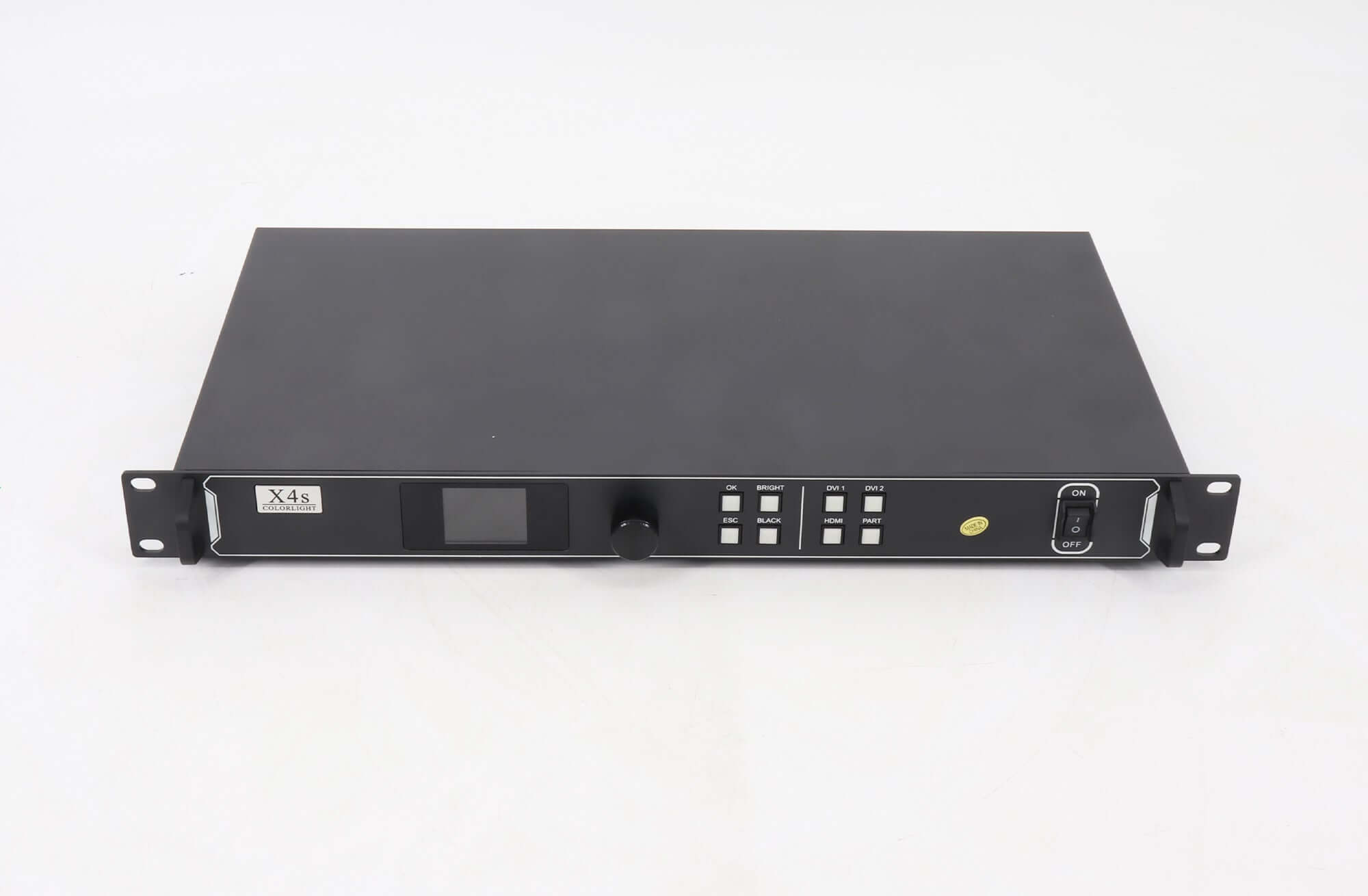
The X1, X2S, X4S, X4M and X6 accept HD sources and drive between 1.31 and 3.9 million pixels from two to six ports. They suit fixed installations and smaller stages where one source fills the wall. The X4S page describes a 1U chassis with local LCD controls for straightforward HD source processing.
02. A larger HD controller
The X12 drives 7.2 million pixels from twelve ports but keeps HD inputs: three HDMI 1.4 and one DVI. It fits large walls fed from HD sources, where 4K input is not needed.
03. 4K and multi-window controllers
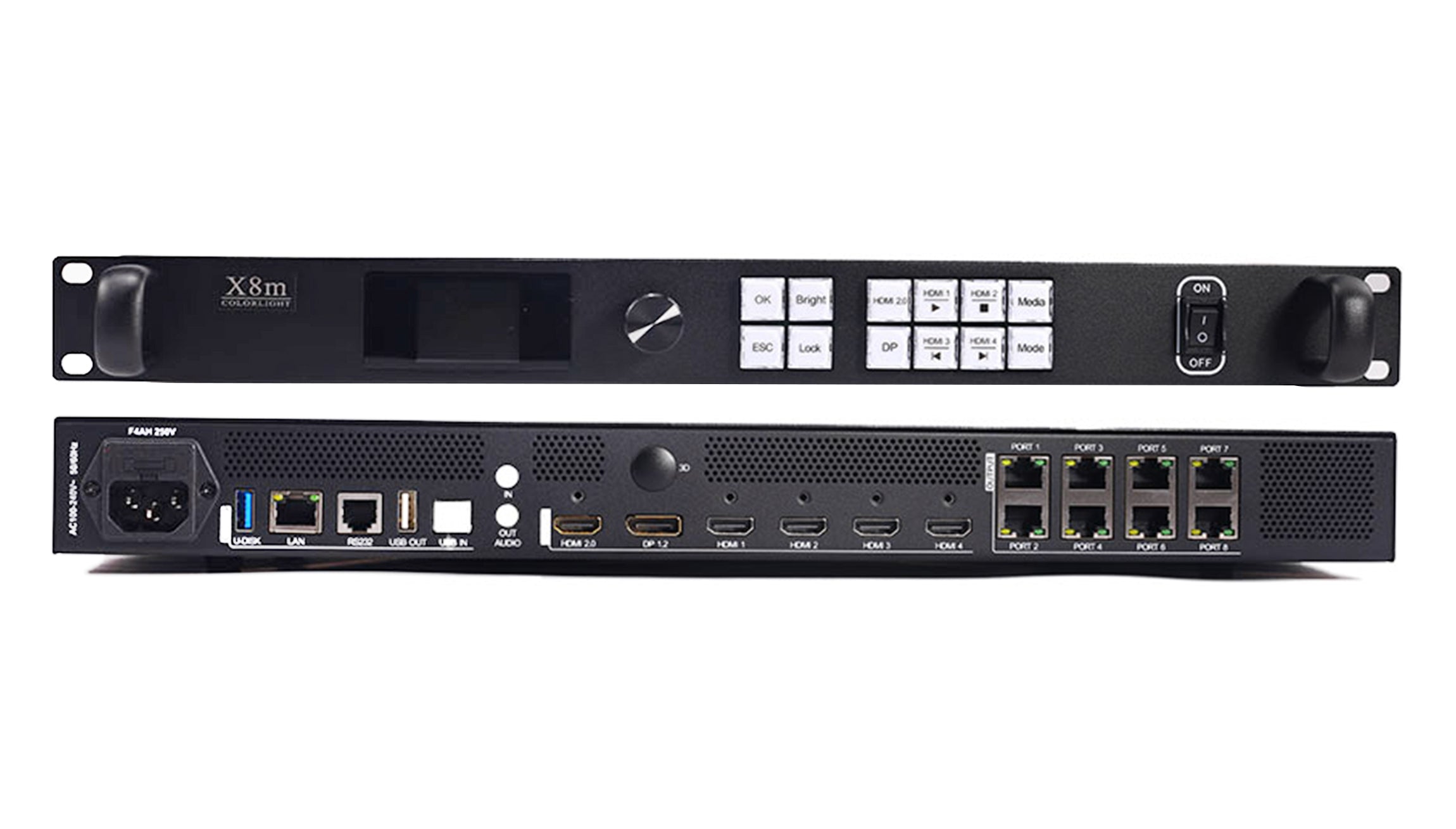
The X8E, X8M, X12M, X16E, X20 and X20M accept 4K sources over HDMI 2.0 and DisplayPort 1.2 at up to 4096 x 2160 at 60 Hz, alongside HD inputs. The M models list layer layouts with up to six HD windows, and the X20 and X20M add 10G optical outputs as an alternative to Ethernet.
04. What every model shares
Across the range, each Colorlight X series controller handles source switching, scaling, cropping and screen positioning, so the source picture can be fitted to the LED wall without a separate scaler. The X4S page lists brightness, color temperature and low-brightness grayscale controls, and a USB IN port for connecting a PC to set parameters. The larger models add network control: the X12M page lists USB control and cascade, RS232, LAN and mobile apps. In practice, a technician who knows one Colorlight X series unit will find the same logic on the others, which helps rental companies that stock several sizes.
2. Colorlight X series models compared
The table lists each model’s ports, loading capacity at 60 Hz and inputs as given on our product pages.
| Model | LED outputs | Loading capacity | Video inputs | Notes |
|---|---|---|---|---|
| X1 | 2 x Gigabit | 1.31 million pixels | 1 HDMI, 2 DVI (up to 1920 x 1200 at 60 Hz) | Scaling and cropping |
| X2S | 2 x Gigabit | 1.31 million pixels | 1 HDMI, 2 DVI (up to 1920 x 1200 at 60 Hz) | Front LCD, knob and keys |
| X4S | 4 x Gigabit | 2.6 million pixels | 1 HDMI 1.4, 2 DVI (up to 1920 x 1200 at 60 Hz) | 1U chassis with LCD controls |
| X4M | 4 x Gigabit | 2.6 million pixels | 2 HDMI 1.4, DVI, VGA, CVBS | USB media playback |
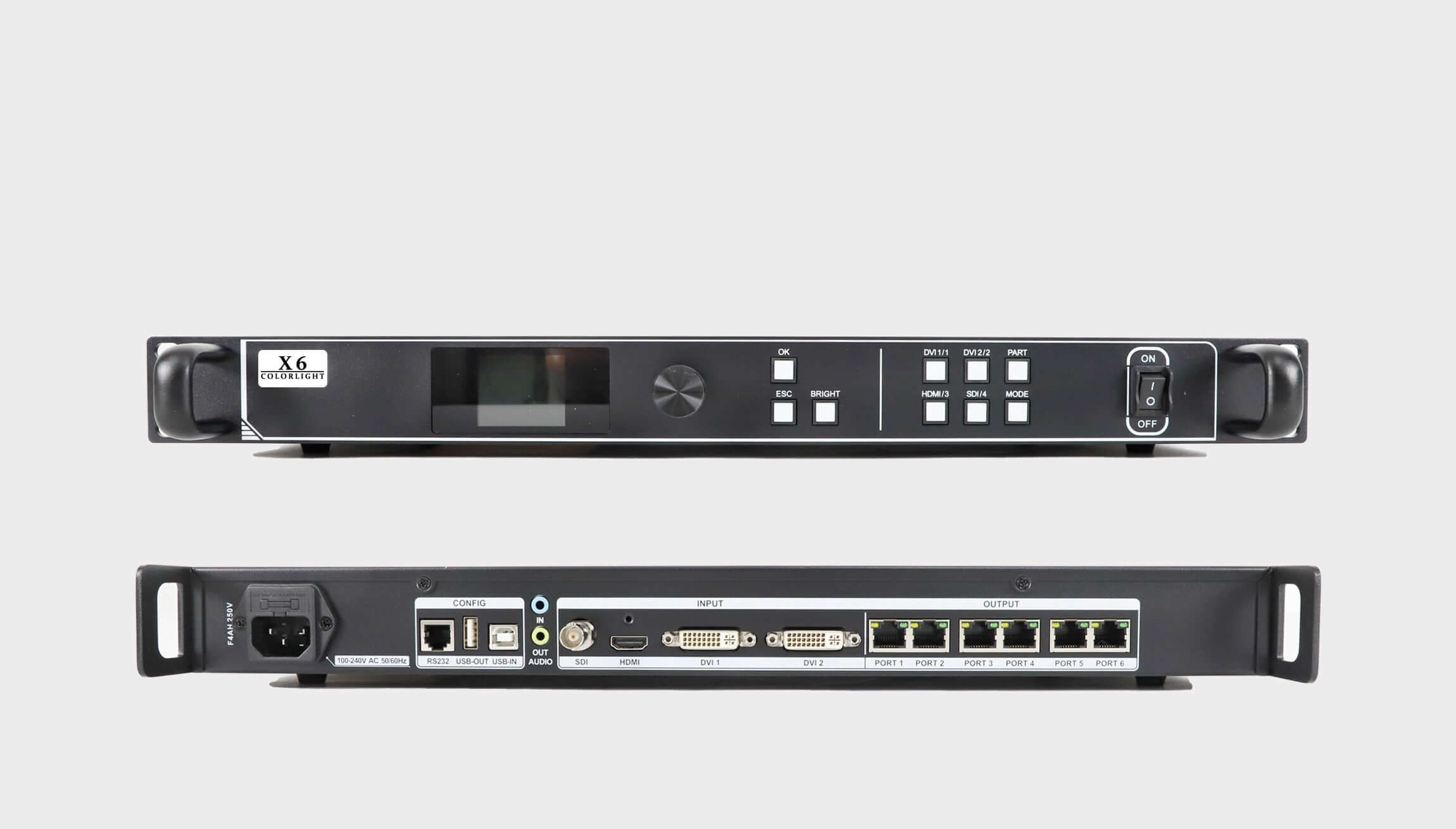
| X6 | 6 x Gigabit | 3.9 million pixels | HDMI, 2 DVI, SDI (up to 1920 x 1200 at 60 Hz) | Three-picture processing |
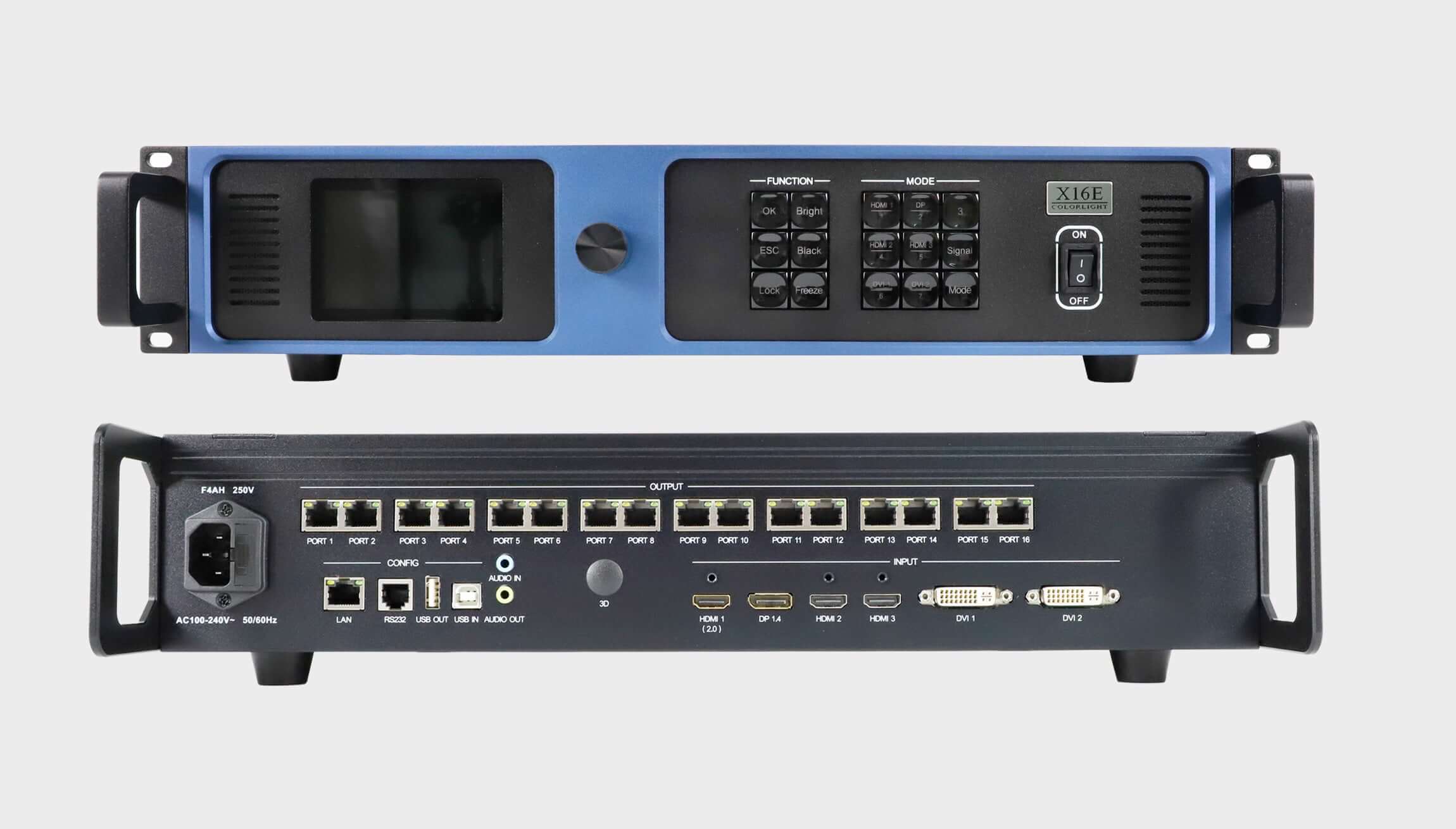
| X8E | 8 x Gigabit | 5.24 million pixels | DP 1.2, HDMI 2.0 (4K 60 Hz), 2 HDMI 1.4, 2 DVI | 2U chassis; 16,384 wide or 8,192 high |
| X8M | 8 x Gigabit | 5.24 million pixels | DP 1.2, HDMI 2.0 (4K 60 Hz), 4 HDMI 1.4 | Up to 6 HD windows; 128 presets |
| X12 | 12 x Gigabit | 7.2 million pixels | 3 HDMI 1.4, 1 DVI | HD inputs only |
| X12M | 12 x Gigabit | 7.86 million pixels | DP 1.2, HDMI 2.0 (4K 60 Hz), 4 HDMI 1.4 | Up to 6 HD windows; 128 presets; 58 W rated |
| X16E | 16 x Gigabit | 10.48 million pixels | DP 1.2, HDMI 2.0, 2 HDMI 1.4, 2 DVI | Up to 6 windows |
| X20 | 20 x Gigabit or 2 x 10G optical | 13 million pixels | DP 1.2, HDMI 2.0, 2 HDMI 1.4, 2 DVI | Specification version 2.0 cited |
| X20M | 20 x Gigabit or 4 x 10G optical (2 active, 2 standby) | 13.10 million pixels | DP 1.2, HDMI 2.0 (4K 60 Hz), 2 HDMI 1.4, 2 DVI | Up to 6 HD windows; 128 scenes; USB playback; Genlock |
Two patterns are worth noting. Capacity rises with port count: the 8-port X8E and X8M both list 5.24 million pixels, which is about 655,000 pixels per port. And at the same port count, the M or E model adds 4K inputs and windows rather than more pixels, apart from the X12M, which lists 7.86 million pixels against the X12’s 7.2 million.
01. Reading the port count
Each output port carries a group of cabinets, so the port count decides how finely you can split the wall. A Colorlight X series model with more ports gives more flexibility in mapping, even when the total pixel count is well within its limit. For example, a 2-million-pixel wall can technically run on a four-port X4S, but if the cabinet layout divides naturally into six groups, a six-port X6 avoids awkward cabling.
02. HD versus 4K models at the same size
At eight ports, the choice is between the X8E and X8M; at twelve, between the X12 and X12M. The HD-only X12 is the simpler unit when every source is 1080p or 1200p. The X12M adds the HDMI 2.0 and DP 1.2 inputs, the multi-window layouts and slightly more capacity. If a 4K source might be added later, buying the M model now avoids replacing the controller.
03. Entry models: X1 and X2S
At the small end, the X1 and X2S list the same core figures: two Gigabit Ethernet outputs, 1.31 million pixels, and one HDMI plus two DVI inputs at up to 1920 x 1200 at 60 Hz. The X1 page cites specification V1.3, dated July 20, 2020, and the X2S page describes a front-panel LCD, adjustment knob and keys for local operation. For a small fixed sign or a meeting-room wall, either entry Colorlight X series model is enough; the choice usually comes down to availability and the front-panel controls the operator prefers.
3. 4K inputs and multi-window processing
The main reason to move from an HD Colorlight X series model to an M or E model is the source, not the wall size.
01. When you need a 4K input
The X8E, X8M, X12M, X16E, X20 and X20M list HDMI 2.0 and DP 1.2 inputs. The X8M, X12M and X20M pages specify up to 4096 x 2160 at 60 Hz on those inputs, and the X8E page lists the same for both. If the media server or camera outputs native 4K at 60 Hz, one of these models avoids a separate scaler. The HD models list inputs up to 1920 x 1200 at 60 Hz, and the X6 page notes that a larger output canvas does not imply native 4K input.
02. Windows and layer layouts
The X8M, X12M and X20M pages list the same three layer layouts: six HD windows, one 4K window plus four HD windows, or two 4K windows. The minimum window or crop size is 64 x 64 pixels, and each unit stores 128 presets or scenes. This makes the M models the natural choice for conference and event walls that show a main presentation with cameras or side content around it.
03. Audio and playback
The X12M page lists a 3.5 mm audio input and output plus HDMI and DP audio decoding. The X20M page lists playback of photos and video from a USB drive, and the X4M page lists USB media playback at the HD level. If the wall must show content without a computer attached, check that the chosen model lists USB playback.
04. Genlock and synchronization
For camera and broadcast work, the X20M page lists Genlock with three options: internal timing, an input source, or automatic layer-based synchronization. Matching the LED wall to the camera’s timing reduces visible rolling and tearing on camera. If the show will be filmed, check that the Colorlight X series model you choose lists Genlock, and plan the reference signal in the system design.
4. High refresh rates and Colorlight X series capacity
Higher refresh output reduces how many pixels a controller can drive. The X8M and X12M pages state this directly, which is useful for broadcast and camera work where higher frame rates matter.
| Model | 60 Hz | 120 Hz | 240 Hz |
|---|---|---|---|
| X8M | 5.24 million pixels | 2.62 million pixels | 1.31 million pixels |
| X12M | 7.86 million pixels | 3.93 million pixels | 1.96 million pixels |
Doubling the refresh rate halves the capacity, and quadrupling it leaves a quarter. A wall that fits comfortably on an X8M at 60 Hz may need an X12M, or two units, at 120 Hz. Size the controller at the refresh rate the show will actually run, not at the 60 Hz headline figure.
01. Per-port capacity at higher refresh
The same rule applies port by port. The X8M’s 5.24 million pixels across eight ports is about 655,000 pixels per port at 60 Hz; at 120 Hz the total halves to 2.62 million, or about 327,500 per port. Cabinet groups that fitted on one port at 60 Hz may need to be split across two ports at 120 Hz. When you plan a high-refresh show on a Colorlight X series controller, redraw the port map at the target refresh rate before choosing the model.
02. Width and height limits
The X8E, X8M and X12M pages list a maximum width of 16,384 pixels or a maximum height of 8,192 pixels, within the total loading limit. These are separate ceilings, not a supported 16,384 x 8,192 canvas, so a very wide but short wall can be driven as long as the total pixel count stays within the limit.
5. Choosing a Colorlight X series model for your wall
Start with the wall resolution and refresh rate, then the sources and windows. The table summarizes typical fits.
| Project need | Models to consider |
|---|---|
| Small wall up to about 1.3 million pixels, HD source | X1 or X2S |
| Wall up to about 2.6 million pixels, HD source | X4S; X4M if VGA, CVBS or USB playback is needed |
| Wall up to about 3.9 million pixels with an SDI camera | X6 |
| Large wall up to about 7.2 million pixels, HD sources only | X12 |
| 4K 60 Hz source and several windows | X8M (up to 5.24 million) or X12M (up to 7.86 million) |
| Very large wall or long fiber runs | X16E, X20 or X20M |
01. A worked example
A stage wall of 3,840 x 1,080 pixels has 4,147,200 pixels, and the main source is a media server at 3840 x 2160 at 60 Hz. At 60 Hz, the X8M’s 5.24 million pixels covers the wall, and its HDMI 2.0 or DP 1.2 input takes the 4K source. If the show runs at 120 Hz, the X8M’s capacity drops to 2.62 million pixels, which is too small; the X12M at 120 Hz lists 3.93 million, also slightly short, so a 120 Hz show at this size needs a larger unit or two controllers. This illustrative calculation shows why the refresh rate has to be fixed before the Colorlight X series model is chosen. At 60 Hz the same wall would also fit the X12M with room to grow, which suits rental stock that serves different stage sizes across a season.
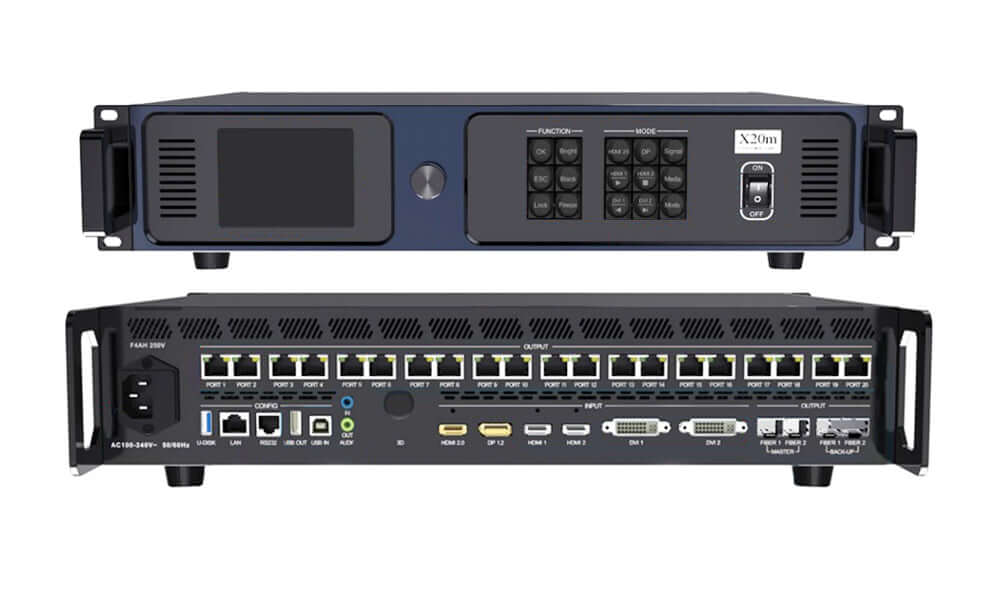
02. Optical outputs on the X20M
The X20M offers 20 Gigabit Ethernet outputs or four 10G optical ports, arranged as two active and two standby ports. Its page notes that Ethernet and optical outputs cannot be used at the same time. Choose the optical route for long runs between the control position and the stage, and plan the fiber receivers at the screen end. The standby ports give a second path for the signal, which is worth using on large events where a single damaged fiber would otherwise take the whole wall down. Label master and backup runs clearly so the crew can tell them apart during load-in.
03. Check the receiving side
The X20M page notes that precise color management requires a corresponding receiving card and that 3D is purchased separately. Before relying on a feature, confirm that the receiving cards in the cabinets support it. If your cabinets use Colorlight 5A-75B cards, our 5A-75B firmware guide covers matching spare cards.
04. Rack space, power and environment
Physical details matter in touring racks and equipment rooms. The X4S page describes a 1U chassis and the X8E page a 2U chassis. The X12M page lists a rated power of 58 W, an AC 100 to 240 V, 50/60 Hz supply, dimensions of 482.6 x 88.0 x 369.1 mm (19.0 x 3.5 x 14.5 in) excluding rubber feet, a net weight of 2.46 kg (5.4 lb) and operation from -20 to 50 °C (-4 to 122 °F). Check depth and airflow before fitting a Colorlight X series unit into an existing rack.
05. Replacing an older Colorlight controller
When an older controller fails, the receiving cards in the cabinets can usually stay as they are; the new controller needs the same or greater port count, enough capacity for the wall at its refresh rate, and inputs that match the existing sources. Moving from an X4S to an X4M, for example, keeps four ports and 2.6 million pixels and adds VGA, CVBS and USB playback. Moving from an X12 to an X12M keeps twelve ports and adds 4K inputs. Save the screen configuration from the old unit if it still powers on, and photograph the port cabling before you remove it, so the replacement Colorlight X series controller can be mapped the same way.
Frequently asked questions
What is the difference between the Colorlight X8E and X8M?
Both have eight Ethernet outputs and list 5.24 million pixels. The X8E page lists DP 1.2, HDMI 2.0, two HDMI 1.4 and two DVI inputs in a 2U chassis. The X8M page lists DP 1.2, HDMI 2.0 and four HDMI 1.4 inputs, multi-window layouts and 128 presets.
Does a higher refresh rate reduce Colorlight controller capacity?
Yes. The X8M page lists 5.24 million pixels at 60 Hz, 2.62 million at 120 Hz and 1.31 million at 240 Hz, all at 8-bit. The X12M page shows the same halving pattern.
Which Colorlight X controllers accept 4K at 60 Hz?
The X8E, X8M, X12M and X20M pages list HDMI 2.0 and DP 1.2 inputs up to 4096 x 2160 at 60 Hz. The X16E and X20 also list HDMI 2.0 and DP 1.2 inputs.
Can the X20M use Ethernet and fiber outputs together?
No. Its page states that Ethernet and optical output cannot be used at the same time.
How many pixels can one port carry on a Colorlight X series controller?
Our pages give totals rather than a per-port figure for most models. Dividing the X8M’s 5.24 million pixels by its eight ports gives about 655,000 pixels per port at 60 Hz, and half that at 120 Hz.
Does the X12 accept 4K sources?
No. The X12 page lists three HDMI 1.4 inputs and one DVI input, which accept HD sources. For a 4K source at 60 Hz with twelve outputs, the X12M lists HDMI 2.0 and DP 1.2 inputs up to 4096 x 2160 at 60 Hz.
Which model should I choose for a 2.6-million-pixel wall?
The X4S and X4M both list four ports and 2.6 million pixels. Choose the X4M if you need VGA or CVBS inputs or USB media playback; otherwise the X4S covers HDMI and DVI sources.
Getting the right Colorlight controller
You can compare full specifications on our product pages for the Colorlight X8m, X12m, X4s and X20m, or browse the full Colorlight range.
To confirm the right Colorlight X series model, send us your wall details: pixel width and height, refresh rate, input sources with their resolution and frame rate, the number of windows and the receiving cards in the cabinets. Product videos are also on the EagerLED YouTube channel.