
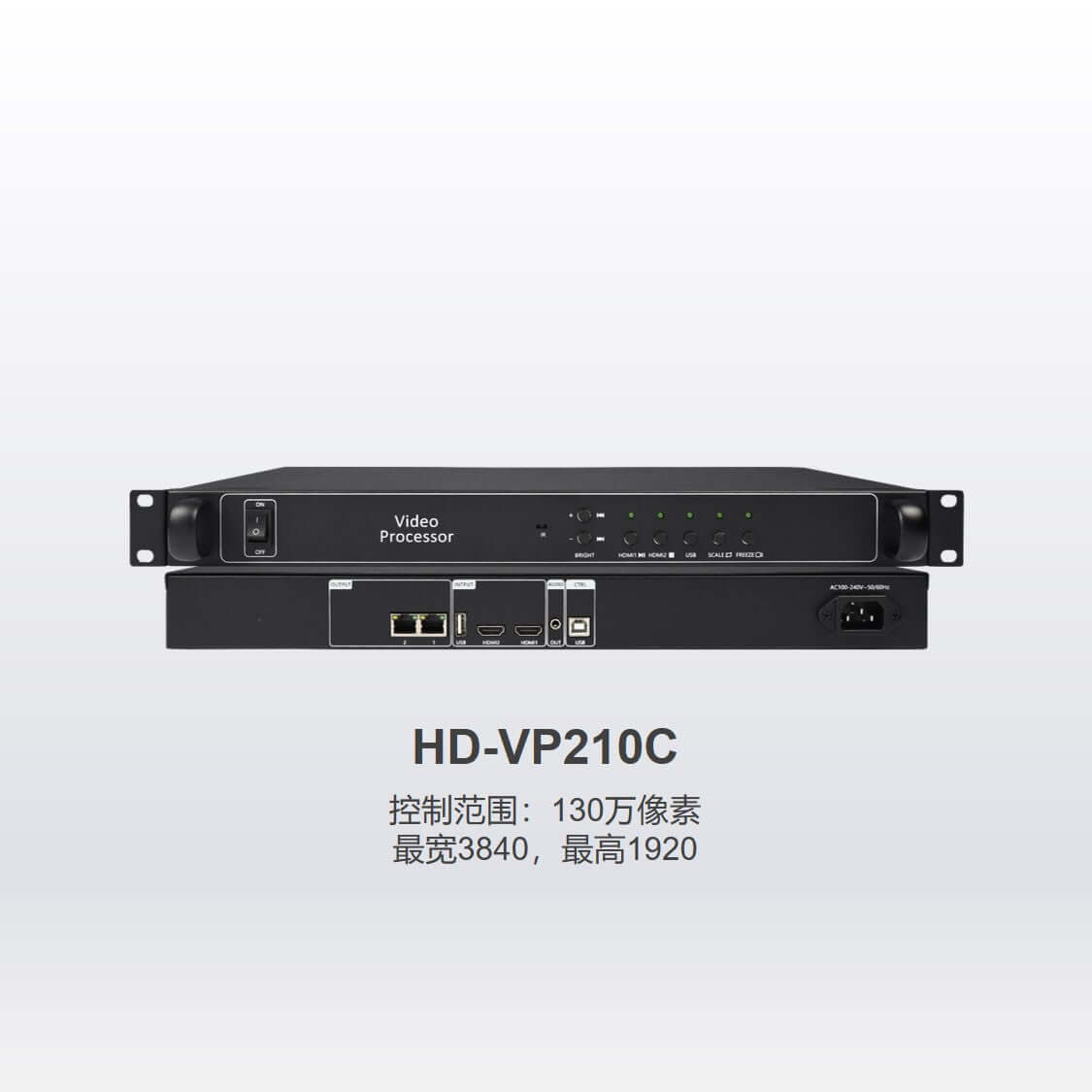
Huidu HD-VP210C LED Video Processor – HDMI & USB
Original price was: $ 91.00.$ 78.00Current price is: $ 78.00.
The Huidu HD-VP210C combines two Gigabit LED outputs, dual HDMI inputs and USB video/image playback. Configure receiving cards and display settings through HDSet using USB-B. The listed LED loading capacity is 1.3 million pixels.
9997 in stock
HD-VP210C LED video processor with USB playback
The Huidu HD-VP210C combines LED video processing, two Gigabit outputs and local USB playback. The product listing specifies a capacity of 1.3 million pixels. Two HDMI inputs allow source selection, while the USB media port plays supported videos and images without a live HDMI source.
HDSet setup and playback controls
Use a USB-B cable to connect a computer for configuration with HDSet. The manual covers receiving-card setup and processor controls including scaling, black screen, freeze, brightness and volume. For local media, store files in the USB drive’s root directory and select USB playback from the front panel.
HDMI accepts up to 1080p at 60 Hz and supplies audio to the processor. A 3.5 mm two-channel output connects to an external amplifier. Brightness adjustment and key lock support routine operation; infrared remote control is optional.
HD-VP210C parameter reference
| LED outputs / stated loading | 2 Gigabit outputs; 1.3 million pixels, as listed in the existing product information |
|---|---|
| Stated dimension limits | Maximum width 3840 pixels or maximum height 1920 pixels; separate limits within the total loading capacity |
| HDMI inputs | 2 × HDMI-A; HDMI 1.3 backward compatible; up to 1920 × 1080p at 60 Hz |
| USB media input | USB 2.0; video and image playback from files in the drive root directory |
| USB video resolution | Up to 1080p in the existing product listing; the linked manual does not specify a playback frame rate |
| Video formats / encoding | mp4, avi, mpg, mkv, mov, vob, rmvb; MPEG4 (MP4), MPEG_SD/HD, H.264 (AVI, MKV), FLV |
| Image formats | jpg, jpeg, png, bmp |
| Audio | Select HDMI audio from one input; TRS 3.5 mm two-channel audio output |
| Configuration software / connection | HDSet; USB-B connection to a computer for receiving-card parameters and device setup |
| Controls | Source selection, scale, black screen, freeze, brightness and volume; key lock listed in original product information |
| Infrared control | Optional, as listed in the product information |
| Power input | 110–240 VAC, 50/60 Hz, according to the user manual |
Interface, software and media-format details are checked against the linked user manual. Loading and maximum screen dimensions are retained from the existing product information because its original Chinese specification link is malformed. Confirm these limits for the supplied unit when planning a maximum-load screen.
Connection diagram
Frequently asked questions
How do I configure an HD-VP210C LED screen?
The user manual uses HDSet. Connect the processor to a computer with a USB-B cable, select the device and open Screen Configuration to set receiving-card parameters. Processor settings include source selection, scaling, brightness and volume.
Can I play pictures and videos directly from USB?
Yes. Put compatible files in the USB drive’s root directory, insert the drive and select USB playback. Check both the extension and video encoding against the supported list. The media USB connection and USB-B configuration port have different purposes.
Does HDMI support 1080p at 60 Hz?
Yes. The manual specifies up to 1920 × 1080p at 60 Hz for HDMI. It does not state the USB playback frame-rate limit, so the HDMI figure should not be assumed to apply to USB files.
What is the listed LED screen capacity?
The product information lists 1.3 million pixels through two Gigabit outputs, with a maximum width of 3840 pixels or height of 1920 pixels. Those are separate limits. Confirm the actual unit and screen mapping before committing to a maximum-size configuration.
Is the infrared remote included?
The existing product information identifies infrared remote control as optional. Confirm the package contents when ordering; the front panel provides local source and display controls.
Downloads
- Huidu HD-VP210C user manual (PDF)
- Original HD-VP210C Chinese specification link — the original URL is malformed; use the user manual above for available setup instructions.
| Weight | 6 kg |
|---|
Be the first to review “Huidu HD-VP210C LED Video Processor – HDMI & USB”
You must be logged in to post a review.
Will I be charged with customs and taxes?
The prices displayed on our site are tax-free (in US Dollars), which means you may be required to pay import duties and taxes once you receive your order. Import taxes, duties, and related customs fees will be determined by your local customs office when your order arrives at its final destination.
Please note that these additional charges and taxes are your responsibility, and we do not take any responsibility for them. We are not liable for paying or reimbursing any customs duties, taxes, or related fees. For more details on these charges, please contact your local customs office.
Shipping
We can ship to virtually any address in the world. Note that there are restrictions on some products, and some products cannot be shipped to international destinations..
When you place an order, we will estimate shipping and delivery dates for you based on the availability of your items and the shipping options you choose. Depending on the shipping provider you choose, shipping date estimates may appear on the shipping quotes page.
Please also note that the shipping rates for many items we sell are weight-based. The weight of any such item can be found on its detail page. To reflect the policies of the shipping companies we use, all weights will be rounded up to the next full pound..
Returns Policy
You may return most new, unopened items within 30 days of delivery for a full refund. We'll also pay the return shipping costs if the return is a result of our error (you received an incorrect or defective item, etc.)..
You should expect to receive your refund within four weeks of giving your package to the return shipper, however, in many cases you will receive a refund more quickly. This time period includes the transit time for us to receive your return from the shipper (5 to 10 business days), the time it takes us to process your return once we receive it (3 to 5 business days), and the time it takes your bank to process our refund request (5 to 10 business days).
If you need to return an item, simply login to your account, view the order using the "Complete Orders" link under the My Account menu and click the Return Item(s) button. We'll notify you via e-mail of your refund once we've received and processed the returned item..
Related products
Reviews
There are no reviews yet.