
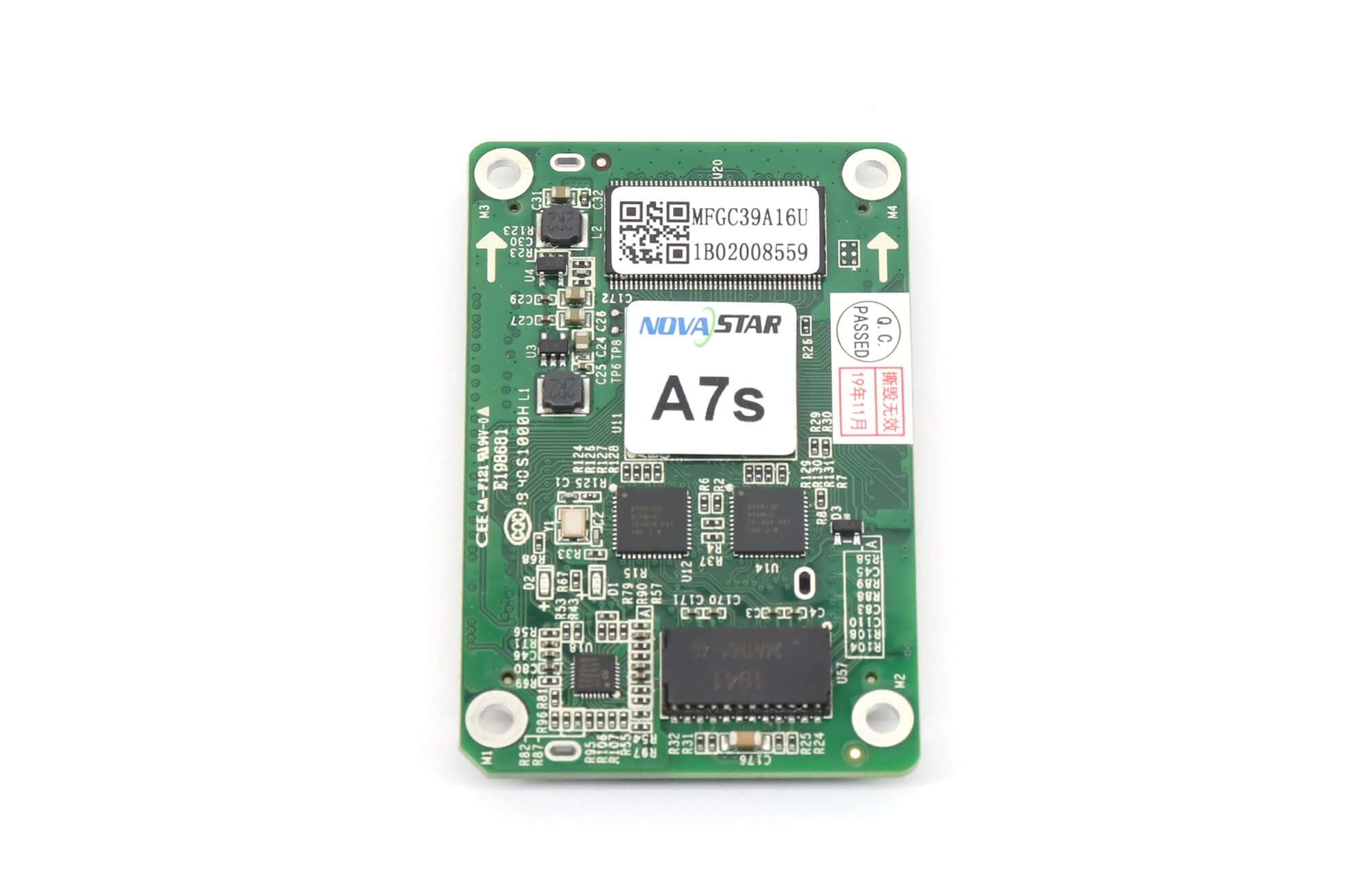


NovaStar A7s Compact LED Receiving Card
$ 18.20
NovaStar A7s receiving card for compact LED cabinets: up to 512 × 256 pixels with PWM ICs or 384 × 256 with common ICs. Size: 70 × 45 × 7.9 mm. Check your hub board, module configuration and firmware before ordering.
99 in stock
The NovaStar A7s receiving card is a compact LED cabinet control card that loads up to 512 × 256 pixels with PWM driver ICs or 384 × 256 pixels with common driver ICs. This listing is for the A7s; confirm the exact model on your existing card before ordering.
It supports up to 32 parallel RGB data groups or 64 serial data groups, expandable to 128 serial groups. Check the hub board, module driver IC, scan mode, and firmware together when planning a replacement.
Key features for LED cabinet control
- Image adjustment: quick correction of dark or bright cabinet seams and image rotation in 90° increments.
- Module maintenance: automatic module calibration and module Flash management for compatible modules.
- Cabinet identification: Mapping helps locate receiving cards within the display.
- Status checks: monitoring of card voltage, temperature and Ethernet communication.
- Display options: a pre-stored image and support for a compatible cabinet LCD module.
- System-dependent functions: 3D requires a compatible controller; LVDS transmission and smart-module operation require dedicated firmware.
A7s electrical and mechanical specifications
| Parameter | Specification |
|---|---|
| Maximum load with PWM driver ICs | 512 × 256 pixels |
| Maximum load with common driver ICs | 384 × 256 pixels |
| Data output | Up to 32 parallel RGB groups or 64 serial groups; expandable to 128 serial groups |
| Input voltage | DC 3.3–5.5 V |
| Rated current / power | 0.5 A / 2.5 W |
| Dimensions | 70.0 × 45.0 × 7.9 mm |
| Net weight | 17.3 g |
| Operating temperature | −20°C to +70°C |
| Operating humidity | 10–90% RH, non-condensing |
| Storage temperature | −25°C to +125°C |
| Packing | Antistatic bag and anti-collision foam for each card; 40 cards per packing box |
| Packing box dimensions | 378.0 × 190.0 × 120.0 mm |
| Compliance listed in the specification | RoHS; EMC Class B |
Dimensions and data-group limits above were checked against NovaStar A7s Specifications V2.1.1. The original download below is V2.0.0; check the hardware revision and required mounting clearance before installation.
Download the original A7s specification
Novastar A7S Small Size LED Display Receiving Card Specification
Check compatibility before replacing an A7s
Before ordering a replacement, collect the following details for an EagerLED compatibility check:
- Identify the installed card: photograph its model label and the hub board on both sides.
- Record the cabinet configuration: provide cabinet pixel width and height, module driver IC, scan mode and wiring photos.
- Check the complete control system: include the sending controller model, firmware version, power input and available mounting space.
- Keep a recovery copy: save the working receiving-card configuration before changing hardware. Have the replacement configuration checked before applying it across the display.
LVDS transmission and smart-module functions require dedicated firmware. The 3D function also depends on a compatible controller. Treat these as system requirements rather than features that become available simply by replacing the receiving card.
A7s selection questions
Can every A7s installation use 512 × 256 pixels?
No. That maximum applies to PWM driver ICs; the listed limit for common driver ICs is 384 × 256 pixels. Match the driver IC, scan mode, data wiring and firmware to the cabinet before selecting the load.
Is this the same card as an A7s Plus?
No. A7s and A7s Plus are different model names. Do not apply another model’s loading capacity to this listing or assume the configuration file is interchangeable. Match the model marking and review the existing system before buying.
Does the A7s play videos by itself?
No. It is a receiving card within an LED display control system. Your sending controller, hub board, and LED modules must be configured as a complete system.
What should I check besides maximum loading capacity?
Check the hub-board connector and pin assignment, module scan settings, driver IC, power input, mounting space, and firmware. Retain a backup of the working configuration before changing hardware.
Request the correct A7s card for your cabinet
Ask for an A7s compatibility and availability check with your required quantity and cabinet details. Compare the receiving card range or browse NovaStar products when discussing a replacement.
| Weight | 0.2 kg |
|---|
Be the first to review “NovaStar A7s Compact LED Receiving Card”
You must be logged in to post a review.
Will I be charged with customs and taxes?
The prices displayed on our site are tax-free (in US Dollars), which means you may be required to pay import duties and taxes once you receive your order. Import taxes, duties, and related customs fees will be determined by your local customs office when your order arrives at its final destination.
Please note that these additional charges and taxes are your responsibility, and we do not take any responsibility for them. We are not liable for paying or reimbursing any customs duties, taxes, or related fees. For more details on these charges, please contact your local customs office.
Shipping
We can ship to virtually any address in the world. Note that there are restrictions on some products, and some products cannot be shipped to international destinations..
When you place an order, we will estimate shipping and delivery dates for you based on the availability of your items and the shipping options you choose. Depending on the shipping provider you choose, shipping date estimates may appear on the shipping quotes page.
Please also note that the shipping rates for many items we sell are weight-based. The weight of any such item can be found on its detail page. To reflect the policies of the shipping companies we use, all weights will be rounded up to the next full pound..
Returns Policy
You may return most new, unopened items within 30 days of delivery for a full refund. We'll also pay the return shipping costs if the return is a result of our error (you received an incorrect or defective item, etc.)..
You should expect to receive your refund within four weeks of giving your package to the return shipper, however, in many cases you will receive a refund more quickly. This time period includes the transit time for us to receive your return from the shipper (5 to 10 business days), the time it takes us to process your return once we receive it (3 to 5 business days), and the time it takes your bank to process our refund request (5 to 10 business days).
If you need to return an item, simply login to your account, view the order using the "Complete Orders" link under the My Account menu and click the Return Item(s) button. We'll notify you via e-mail of your refund once we've received and processed the returned item..
Related products

Reviews
There are no reviews yet.