
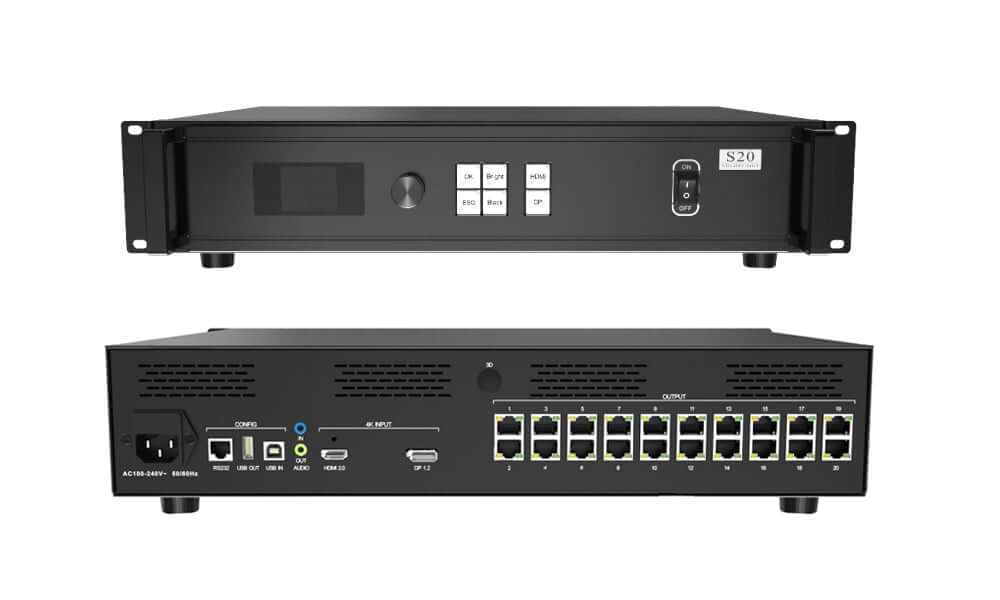
Colorlight S20 sending box work for led display screen
$ 934.00
Colorlight S20 sending box with HDMI 2.0 and DP 1.2 inputs, 20 Gigabit outputs and up to 8.85 million pixels. Check the 650,000-pixel port limit, reduced loading above 1280 pixels of port height, and optional 3D configuration.
2500 in stock
Colorlight S20 LED sending box with HDMI and DP inputs
The Colorlight S20 is an LED sending controller with one HDMI 2.0 input, one DP 1.2 input and twenty Gigabit Ethernet outputs. It accepts sources up to 4096 × 2160 at 60 Hz and supports seamless switching between the two inputs.
This reference follows S20 Specification Version 2.1. The maximum device loading is 8.85 million pixels. Each Ethernet output supports up to 650,000 pixels, subject to its dimension limits. The single-port loading capacity decreases when the loaded height exceeds 1280 pixels, so tall layouts require an additional capacity check.
S20 input and output loading limits
| HDMI 2.0 input | 1; maximum 4096 × 2160 at 60 Hz |
|---|---|
| DP 1.2 input | 1; maximum 4096 × 2160 at 60 Hz |
| Input formats | 8-bit RGB444, YCbCr444 and YCbCr422 listed in the specification |
| Total LED loading | Up to 8,850,000 pixels |
| Ethernet outputs | 20 × Gigabit RJ45 |
| Single-port loading | Up to 650,000 pixels; decreases above 1280 pixels of loaded height |
| Device dimension limits | Maximum width or height 8192 pixels, within total loading |
| Single-port dimension limits | Maximum width or height 4096 pixels, within the applicable port loading |
Do not multiply twenty ports by 650,000 pixels to calculate the supported screen capacity. That gives 13 million pixels, which exceeds the documented 8.85-million-pixel device limit. Check total screen pixels, per-port loading and the height-related reduction together.
Source switching and receiving-card setup
The HDMI and DP inputs support EDID and custom resolution settings within the control range. Confirm the computer or video source timing before mapping the LED screen. A 4096 × 2160 source contains 8,847,360 pixels, close to the device’s stated total capacity; output wiring and per-port conditions still need verification.
The Version 2.1 reference lists compatibility with Colorlight receiving cards and multifunction cards. For a replacement controller or a new installation, confirm the exact receiver model, module driver IC, scan mode and existing configuration files. Preserve the working parameters before changing the screen setup.
Ethernet-port redundancy and controller redundancy are supported. Plan the backup connections and available output loading for the selected topology. These options require configuration and testing rather than assuming that every output remains available as an independent full-load channel.
Control, audio and installation
| Local control | LCD, rotary knob, function keys and HDMI/DP selection keys |
|---|---|
| USB IN / OUT | Computer parameter setup / USB cascade output |
| RS232 | RJ11 6P6C interface for third-party control |
| Audio | Independent input and output; HDMI/DP audio processing and output |
| Power input / consumption | AC 100–240 V, 50/60 Hz / 40 W |
| Chassis dimensions | 2U; 482.6 × 88.0 × 369.0 mm, W × H × L as listed |
| Net weight | 5.1 kg |
| Operating environment | −20°C to +70°C; 0–80% RH, non-condensing |
Use the correct RJ11-to-DB9 serial cable arrangement from the specification. Check chassis clearances, handles, feet, rear connectors and ventilation against the drawings before rack installation. Optional 3D functions require the appropriate supplied configuration and accessories; confirm these with the order.
S20 selection questions
Do twenty Ethernet ports provide 13 million pixels?
No. Version 2.1 limits the complete S20 to 8.85 million pixels. The individual port maximum does not override the device maximum.
Can a tall port layout keep the full 650,000-pixel capacity?
The specification says port capacity decreases when the loaded height exceeds 1280 pixels. Verify the actual dimensions and mapping before selecting the controller.
Does the S20 have the X20’s optical outputs?
The S20 reference lists twenty Gigabit Ethernet outputs. The Colorlight X20 reference offers Ethernet or optical output modes and a different total capacity. Select the model for the required transmission method.
Is 3D included as a standard function?
Version 2.1 marks 3D as optional. Confirm the required hardware, accessories and receiving-card configuration before ordering.
Contact EagerLED with the screen resolution, height loaded on each port, receiving-card model, source format and backup plan for a selection check.
Technical reference: Colorlight S20 specification PDF, Version 2.1, including loading restrictions, serial wiring and installation drawings.
| Weight | 8 kg |
|---|
Be the first to review “Colorlight S20 sending box work for led display screen”
You must be logged in to post a review.
Will I be charged with customs and taxes?
The prices displayed on our site are tax-free (in US Dollars), which means you may be required to pay import duties and taxes once you receive your order. Import taxes, duties, and related customs fees will be determined by your local customs office when your order arrives at its final destination.
Please note that these additional charges and taxes are your responsibility, and we do not take any responsibility for them. We are not liable for paying or reimbursing any customs duties, taxes, or related fees. For more details on these charges, please contact your local customs office.
Shipping
We can ship to virtually any address in the world. Note that there are restrictions on some products, and some products cannot be shipped to international destinations..
When you place an order, we will estimate shipping and delivery dates for you based on the availability of your items and the shipping options you choose. Depending on the shipping provider you choose, shipping date estimates may appear on the shipping quotes page.
Please also note that the shipping rates for many items we sell are weight-based. The weight of any such item can be found on its detail page. To reflect the policies of the shipping companies we use, all weights will be rounded up to the next full pound..
Returns Policy
You may return most new, unopened items within 30 days of delivery for a full refund. We'll also pay the return shipping costs if the return is a result of our error (you received an incorrect or defective item, etc.)..
You should expect to receive your refund within four weeks of giving your package to the return shipper, however, in many cases you will receive a refund more quickly. This time period includes the transit time for us to receive your return from the shipper (5 to 10 business days), the time it takes us to process your return once we receive it (3 to 5 business days), and the time it takes your bank to process our refund request (5 to 10 business days).
If you need to return an item, simply login to your account, view the order using the "Complete Orders" link under the My Account menu and click the Return Item(s) button. We'll notify you via e-mail of your refund once we've received and processed the returned item..
Related products




Reviews
There are no reviews yet.